
Data Warehouses vs. Data Lakes#
In the 1990s, data warehouses became popular. A program extracts data from the databases that run a business, transforms it to fit the warehouse’s tables, and loads it into the warehouse. The three steps are called ETL. A table’s columns and their types are called its schema. But each table’s schema had to be set before any data was loaded, and warehouses became very expensive to maintain as data grew.
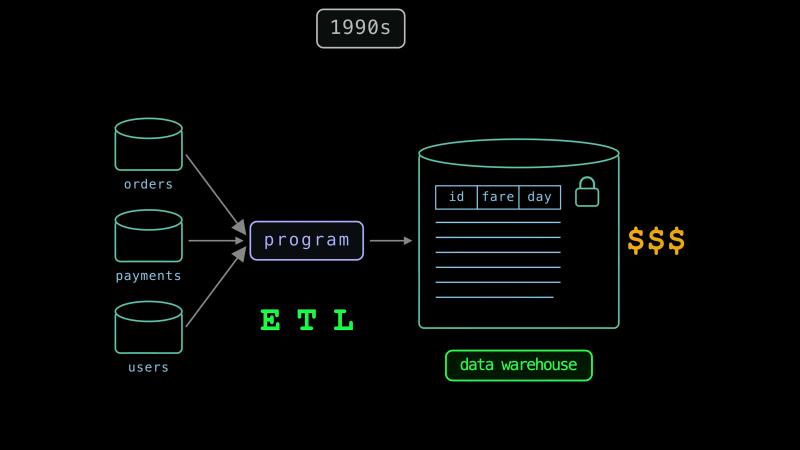
In the 2010s, data lakes became popular. A data lake keeps large amounts of structured, semi-structured, and unstructured data as files in one place. These files can hold tables, text, or images in their original formats, and a program can write them without checking them against a table’s schema. People were also pretty happy that they didn’t have to deal with schemas anymore, so they started loading data into files and then transforming it straight outta Parquet.
Loading first and transforming later is called ELT. But there’s no free lunch with ELT. As loading data got easier, transforming got harder. Let’s see an example of a data lake and the problems it has.
Parquet Data Lake Example#
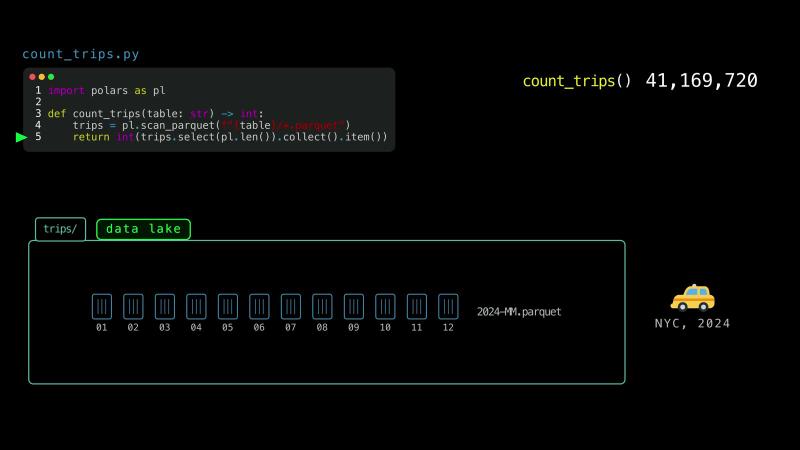
This function counts the taxi trips in a folder of Parquet files.
import polars as pl

def count_trips(table: str) -> int:
    trips = pl.scan_parquet(f"{table}/*.parquet")
    return int(trips.select(pl.len()).collect().item())
The folder holds New York’s taxi trips of 2024. Each month is one file. The function returns 41 million trips.
Here are four problems that can happen in data lakes.
First, if a program adds a month of trips in three files, but gets interrupted after the first file, the folder now only has one third of the month. A change that happens completely or not at all is called atomic.
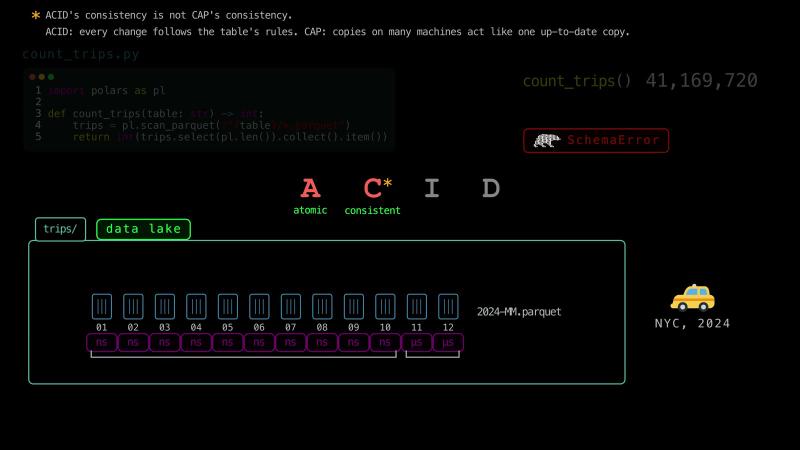
Second, the files New York released have inconsistencies. Ten of them describe the pickup times as nanoseconds, but two describe them as microseconds. So, Polars can’t read the pickup times of all 12 files at once. A table has rules, such as one type for each column. A change that does not break them is called consistent.1
Third, suppose another program sorts the trips of each month by pickup time. It writes 12 sorted files, and then it deletes the 12 old files. When our function runs between these two steps, it counts every trip twice, and it incorrectly returns 82 million trips. A change that readers never see partially done is called isolated.
Fourth, suppose a program adds a month of trips in one file and reports that it’s done. The computer can keep some of the file’s data in its memory for a while before it writes the data to the disk. If the power goes out before then, the month’s trips can be lost. A finished change that stays saved after a failure is called durable.
ACID in Data Lakes#
Together, atomicity, consistency, isolation, and durability are called ACID. Database management systems are usually built to support all four.
ACID was named in 1983. Most database management systems of that time stored tables row by row. Data lakes came more than 20 years later. A typical database management system stores its data in its own files, and only the system itself changes them. So, it can support ACID.
In a data lake, many tools change the files directly. How can a folder of files keep ACID?
Apache Iceberg is one of the most widely used solutions that provide ACID guarantees over data lakes. Here, we change the function to read the same trips from an Iceberg table.
import polars as pl
from pyiceberg.catalog import load_catalog

def count_trips(table: str) -> int:
    trips = pl.scan_iceberg(load_catalog("local").load_table(table))
    return int(trips.select(pl.len()).collect().item())
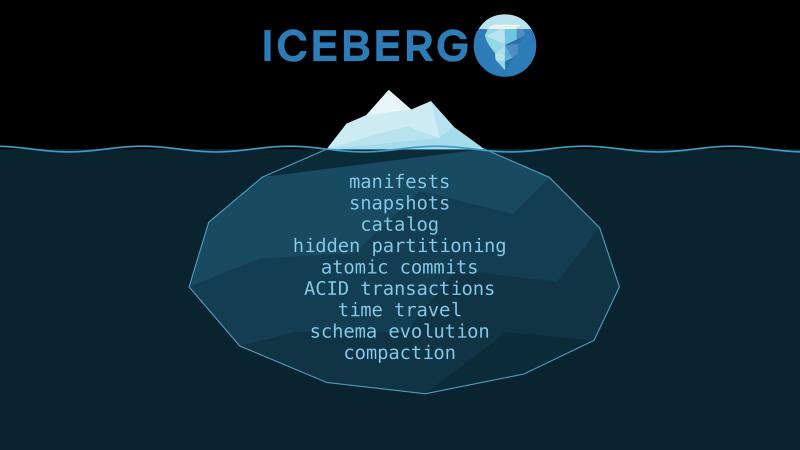
Beyond ACID compliance, Iceberg also solves many other problems of data lakes. So, Iceberg with Parquet files is one of the most widely used combinations in big data engineering. In this chapter, we will see what makes Iceberg special.
Hive Tables#
Managing big data takes three jobs: storing the data, processing it, and keeping data about the data, which is called metadata.
In 2006, Hadoop did the first two jobs on many machines. Its file system is called HDFS, and it stored the files on prem. MapReduce processed the files in parallel, but each MapReduce job was a custom program that was hard to write. Modern data lakes keep their files in cloud object storage, like Amazon S3, Google Cloud Storage, and Azure Blob Storage.2
But neither HDFS nor object storage does the third job. Nothing records which files make up a table, so a lake quickly becomes unmanageable. To find the files, a reader needs to list their folder, and listing has limits as well. For example, you may need multiple requests to list the complete contents of a folder.
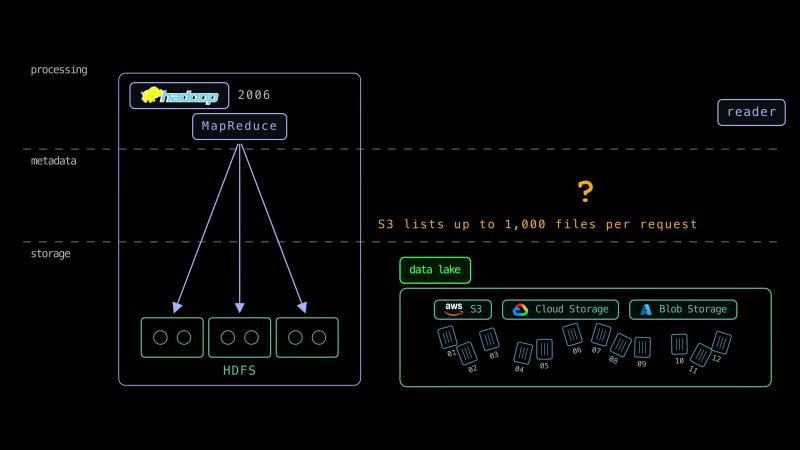
So, in 2009, engineers at Facebook described a system called Hive to fix some of these problems.
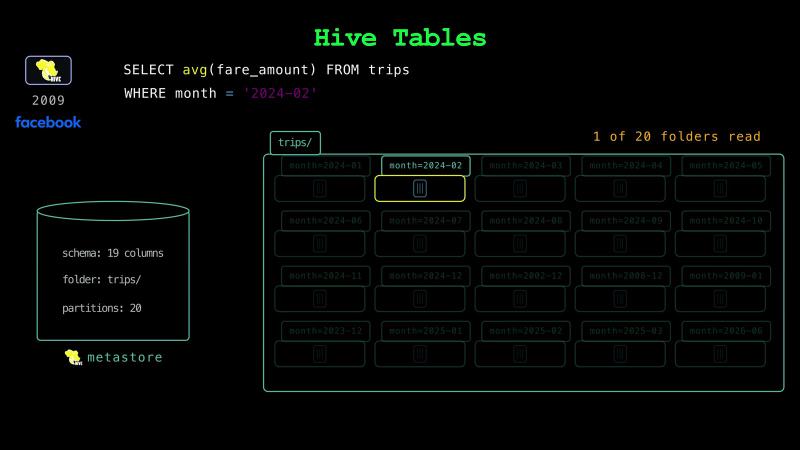
Hive runs SQL queries on files in Hadoop, so a query is easier to write than a MapReduce job. A Hive table keeps its files in one folder. Inside it, Hive can split the rows into subfolders by the value of a column, such as the month. Each subfolder is called a partition. A database called the Hive metastore keeps each table’s schema, its folder, and its list of partitions.
When an SQL query filters on the month column, a reader skips the other folders, which is called partition pruning. Let’s say we partition New York’s taxi trips of 2024 by the month of the pickup time. The data is not cleaned up. Some of the trips have pickup times from other years. So, the trips fill 20 folders instead of 12. When a query for the trips of February 15th also filters on the month, DuckDB reads one folder out of 20. Engines like Spark, DuckDB, and Polars still read and write folders like these.
Hive tables are a good first step, but they have problems too. First, the metastore keeps folders, not files. So, a reader still lists every folder it reads. At Netflix, one month of one table had 2.7 million files in 2,688 partitions. Before a single query could read any data, planning which files to read took 9.6 minutes.
Second, programs like Spark and DuckDB still change a Hive table’s files one at a time. So, their changes are still not atomic or isolated.
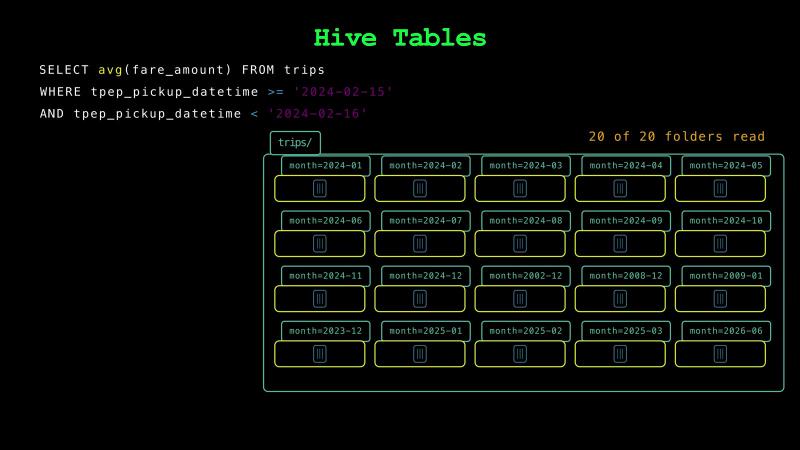
Third, a query must filter on the partition column itself to skip folders. For example, when a query filters only on the pickup time, DuckDB reads all 20 folders.
Iceberg Tables#
In 2017, engineers at Netflix released Iceberg to fix the problems of Hive tables. Iceberg became a top-level Apache project in 2020. A format that turns many files into one table is called a table format. Delta Lake from Databricks and Apache Hudi from Uber are other popular table formats.
Here, we write our table with Iceberg’s library for Python, which is called PyIceberg. The table keeps its data in ordinary Parquet files. Next to them, PyIceberg writes a tree of small files that describe the table.
A file that lists data files is called a manifest file. For each data file, the manifest stores its path, its format, its partition, its number of rows, and the smallest and largest value of each column. Like the Hive table, our table is partitioned by the month of the pickup time. New York’s file for February also has a few trips from other months. So, adding that file wrote five data files, one for each month. Two of them hold a single trip. A data file can be a Parquet, ORC, or Avro file. Because the manifest stores each file’s format, one table can mix all three.
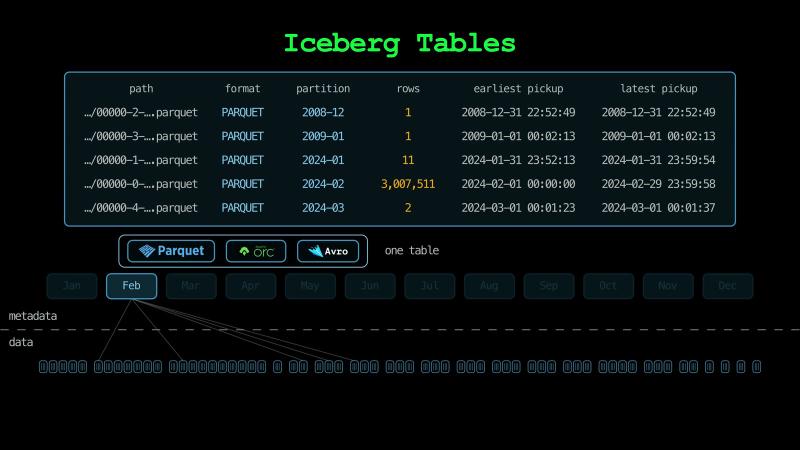
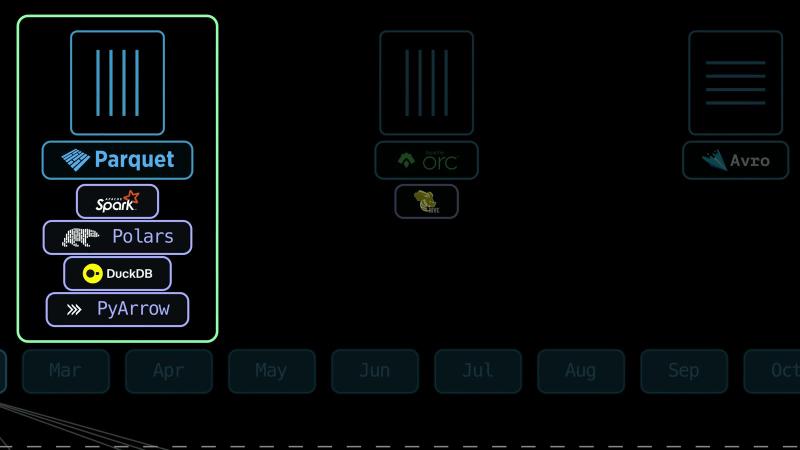
Avro stores data row by row, which suits sending records one at a time. Parquet and ORC store data column by column, which suits data lakes, where a query reads a few columns of many rows. ORC was made to speed up Hive. Parquet was made for every tool that works with Hadoop, and it became Spark’s default format. So, Parquet became the winner of the three. A manifest file itself is an Avro file.
The table’s data files at one moment make up one version of the table, which is called a snapshot. A manifest list names the manifests of one snapshot. It’s an Avro file too.
A metadata file stores the table’s schema, its partitioning, and its list of snapshots. It’s a JSON text file.
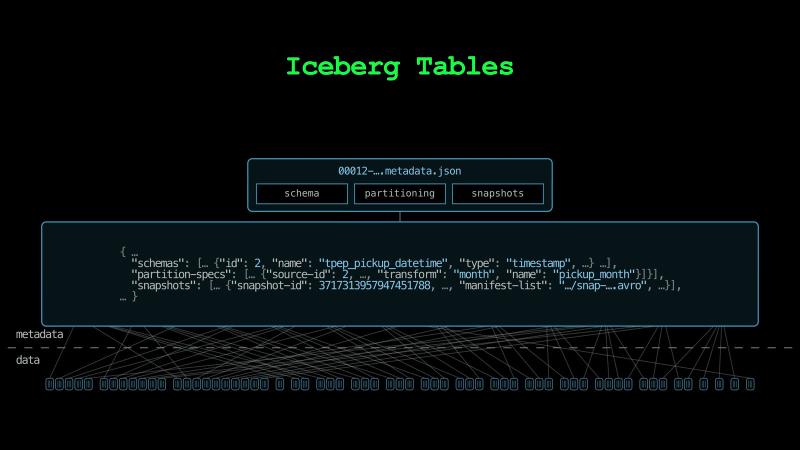
At the top level of the logical hierarchy, a catalog stores where the current metadata file is. In our example, the catalog is an SQLite database, and the location is one value in one row. Other catalogs keep this location in PostgreSQL, in the Hive metastore, or in a cloud service like AWS Glue.
So, a reader asks the catalog for the metadata file, reads the manifest list and the manifests, and then reads only the data files it needs. It never lists a folder. Our 62 data files take 712 MB, and the metadata a reader reads takes about 112 KB.
Hidden Partitioning#
In a Hive table, a query has to filter on the partition column itself to skip folders. In Iceberg, a partition can be computed from a column. Our table is partitioned by the month of the pickup time. The metadata file stores this rule. A writer computes the month of each row, and each manifest stores the month of each data file. A query filters on the pickup time itself, and the reader works out the months it needs, which is called hidden partitioning.
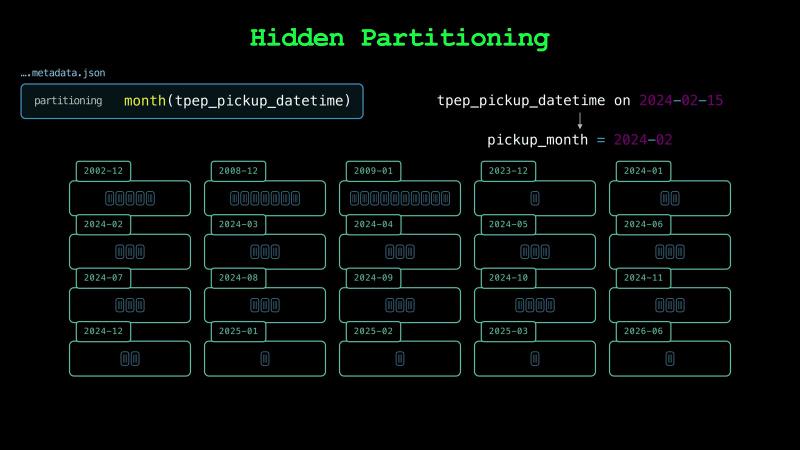
The trips with pickup times from other months go into partitions of their own. So, the smallest and largest pickup times of February’s files stay inside February.
February’s partition holds three files, and their smallest and largest pickup times in the manifests rule out the two small ones. So, for the trips of February 15th, the reader keeps one data file out of 62 before it opens any data file.
A Parquet file contains a summary of its contents in its footer. When an Iceberg writer adds a data file, it copies each column’s smallest and largest values from the footer into the manifest. So, the reader skips data files without opening their footers. Inside the file it keeps, the Parquet reader uses the footer to skip groups of rows, which are called row groups.
Atomic Commits#
A writer uses the same tree to change the table all at once. To add rows, it first writes its new data files and its new metadata files. The old manifests didn’t change, so the writer reuses them. Its new manifest list points to the old manifests and to one new manifest for the new data files. The catalog still points to the old metadata file, so readers don’t see the new files yet.
Then the writer asks the catalog to point to its new metadata file, but only if the catalog still points to the metadata file the writer started from. The pointer is one value in one row. The catalog checks it and changes it in one step, so the change happens atomically. Moving the pointer is called a commit.
Iceberg itself is only files, so the commit has to happen in the catalog. PyIceberg doesn’t lock the table while it writes the files. Our catalog is an SQLite database, and the commit is one UPDATE statement that names the metadata file the writer started from. SQLite runs one UPDATE at a time. So, only one writer at a time can move the pointer. Spark, Trino, and PyIceberg all commit through the catalog, so they can write to the same table without knowing about each other.
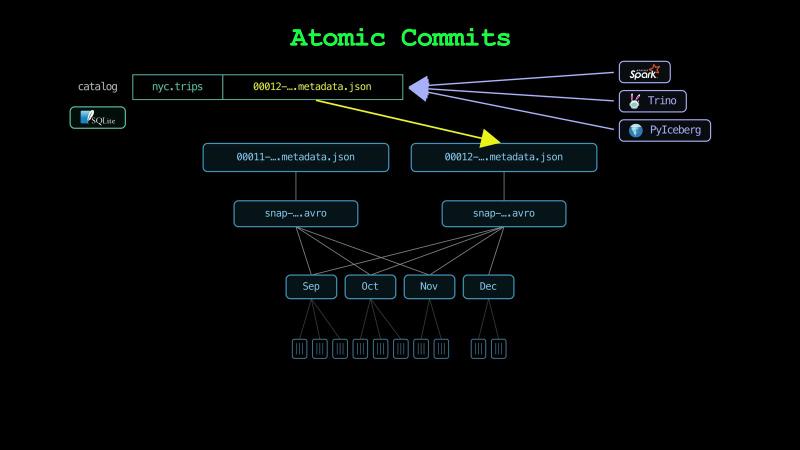
If a writer stops before it commits, the table doesn’t change. When we stop the program that adds a month, the table keeps the same number of trips. The files it writes stay in storage until a cleanup removes them.
When two writers commit at the same time, the second one finds that the pointer has moved. If its change still fits the new version, it applies the change there and tries again. In our example, PyIceberg waits a tenth of a second, and then the second writer commits.
ACID Transactions#
Iceberg also keeps the other three properties of ACID. The metadata file stores the table’s schema, and a writer writes every data file with that schema. So, all 62 of our data files describe the pickup times as microseconds, and Polars reads them as one column. If we try to add trips whose fares are text, PyIceberg refuses them.
![The metadata file’s schema gives pickup: timestamp, a brace gathers all 62 data files under one μs, Polars reads them as datetime[μs], and A, C, I, and D are green](/blog/posts/apache-iceberg/schema-enforced_hu_b40c163b22640d12.jpg)
Readers that started before a commit keep reading the old snapshot, and its files stay where they are. So, a reader sees the whole old table or the whole new table.
Iceberg gets durability from its storage and its catalog. A writer commits only after it has written every new file. Object storage like S3 keeps each finished file on several devices. With its default settings, a catalog in PostgreSQL saves each commit to the disk before it reports the commit. So, with storage and a catalog like these, a finished commit stays saved after a failure.
Time Travel#
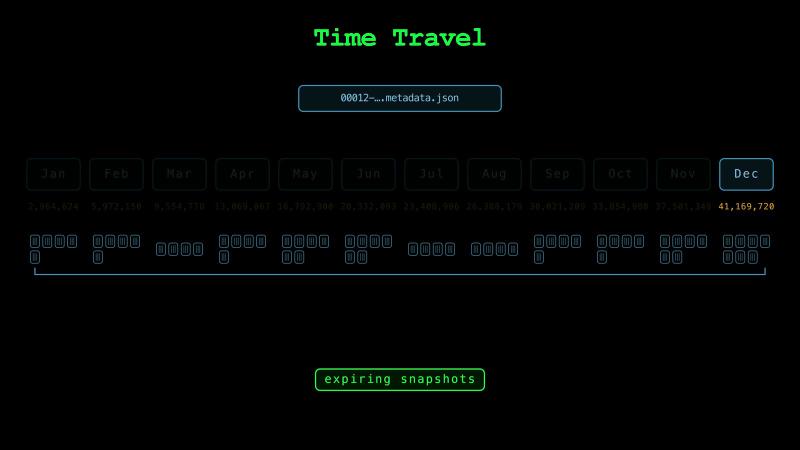
The old snapshots stay in the metadata file, and their data files stay in storage. So, a reader can read the table as it was at any snapshot, which is called time travel. Our table has one snapshot for each month we added. At the second snapshot, the table holds the 6 million trips of January and February.
Old snapshots keep old files, so the storage grows. But snapshots share every file that didn’t change, so keeping old versions doesn’t copy any data. Removing old snapshots and the files that only they need is called expiring snapshots.
Schema Evolution#
Changing the schema of a table that already has data is called schema evolution. Renaming a column is one example. Iceberg gives every column a number, which is called a field ID. Each data file stores the field IDs of its columns, and a reader finds columns by field ID. So, renaming a column changes only the metadata file. In our example, renaming the fare column takes a few milliseconds, and no data file is written again.
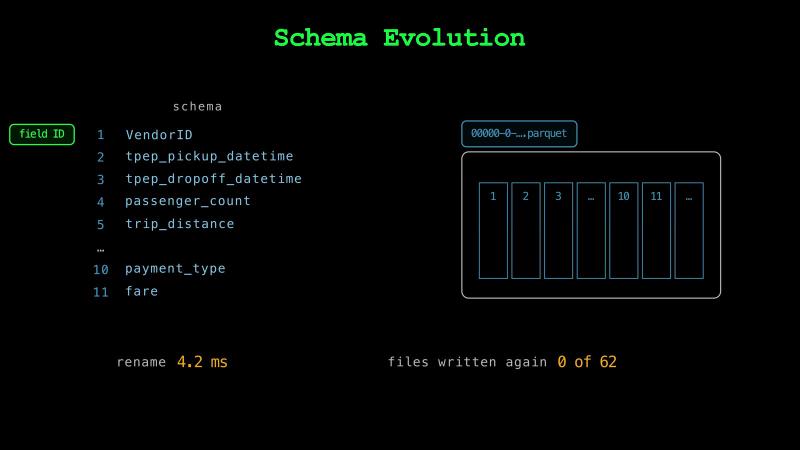
In a folder of Parquet files, Polars, DuckDB, and PyArrow find columns by name. So, renaming the column in the files means writing all 12 files again.
Iceberg’s format has versions. Version 2 added files that mark deleted rows, so a delete doesn’t have to write whole data files again. Version 3 added new types and a new way to mark deleted rows, which is called a deletion vector. PyIceberg writes version 2 by default.
Compaction#
Each commit of new rows writes at least one data file, a manifest, a manifest list, and a metadata file. A program that commits every minute makes 1,440 commits a day. In our example, a program writes the trips of one day this way. With PyIceberg’s default settings, the table ends up with 1,440 data files that take 15 MB, and 4,321 metadata files that take 758 MB. The first commits take about 7 ms each, and the last ones take 300 ms. Reading the day takes 80 times as long as reading the same trips after we merge them into one file.
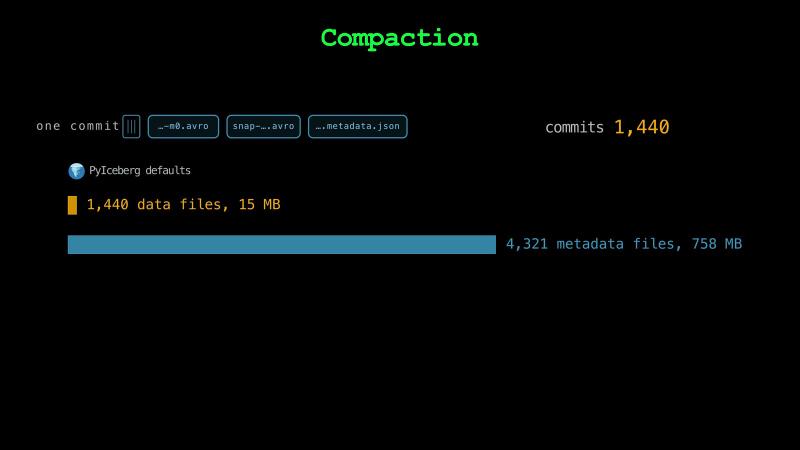
So, a table with many small writes needs regular maintenance. Merging small files into larger ones is called compaction, and expiring old snapshots keeps the metadata small. Iceberg comes with a compaction tool that runs on Spark.
Compaction can also change the file format. Because Avro stores data row by row, a writer can write Avro files faster than Parquet files. So, a streaming pipeline can quickly write small Avro files first, and compaction can rewrite them into large Parquet files later.
Iceberg vs. Delta Lake#
Parquet with Delta Lake is another widely used combination. Databricks launched Delta Lake in 2017 and released it as open source in 2019.
Both formats store a table’s data in Parquet files and describe the table in metadata files next to them. Both commit each change atomically, keep old versions for time travel, and support schema evolution.
But Delta Lake keeps its metadata in a folder of JSON files, which is called the transaction log, and each commit adds one file to it. Iceberg keeps a tree of metadata files, and a catalog points to the current one. Delta Lake partitions by the value of a column, as Hive does. Iceberg can compute a partition from a column. Delta Lake stores data only in Parquet files, and Iceberg can also use ORC and Avro files.
Databricks makes every table a Delta Lake table by default. So, for a team that works in Databricks, Delta Lake is a good choice. AWS, Google Cloud, and Snowflake all manage Iceberg tables for their users, and so does Databricks. So, for a team that wants one open table format across many platforms, Iceberg is a good choice.
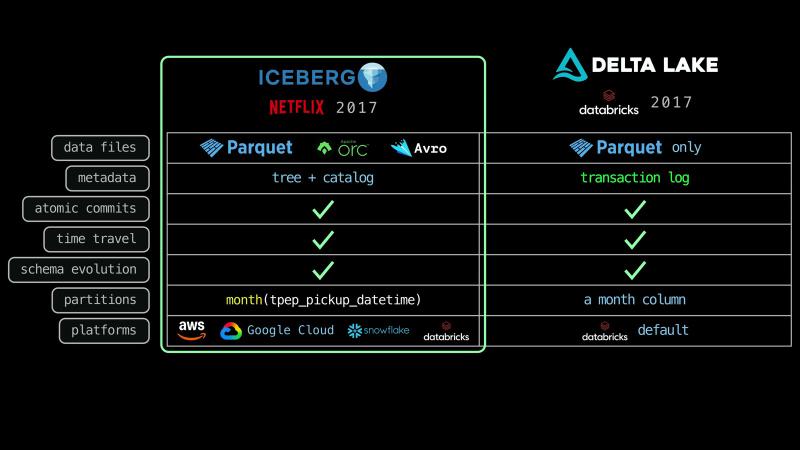
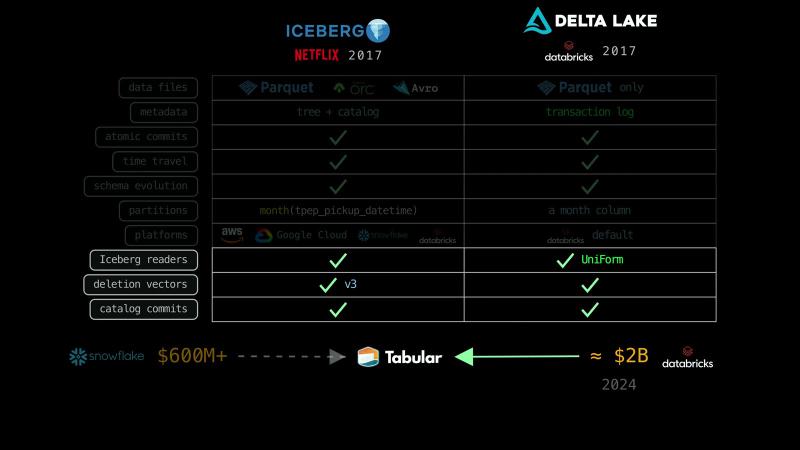
The two formats are also growing closer. Delta Lake can write Iceberg metadata next to its own, which is called UniForm. So, Iceberg readers can read a Delta Lake table. Version 3 of Iceberg’s format added deletion vectors in a layout chosen to match Delta Lake’s. Delta Lake added tables that commit through a catalog, as Iceberg tables do.
There’s even more connection between the two formats. Iceberg’s creators started a company called Tabular. Bloomberg reported that Snowflake was in talks to buy Tabular for more than $600 million, and that Databricks paid nearly $2 billion for it in 2024.
Iceberg for ML and AI#
In a machine learning pipeline, a training job can store the snapshot ID of the data it reads. So, for reproducibility, we can train the model again on exactly the same rows, even after the table has changed, until that snapshot expires.
When a user asks us to delete their data, a delete writes a new snapshot without their rows. But the old snapshots still hold the rows until we expire them.
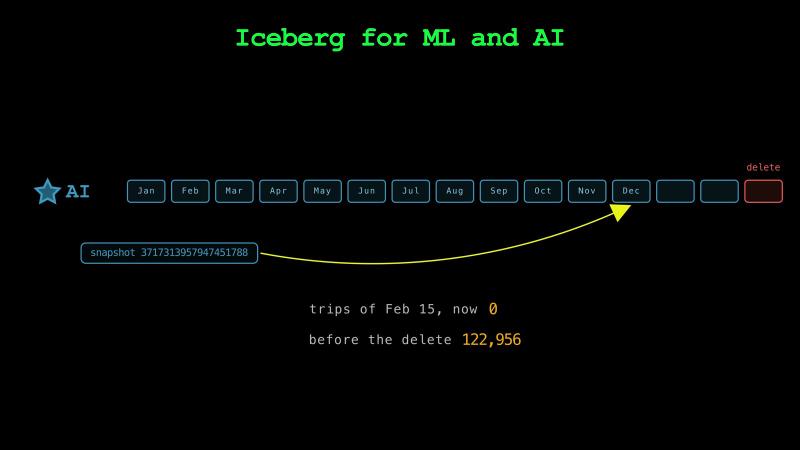
When we ask an AI assistant to create a pipeline, we can ask for an Iceberg table that is partitioned by the month of the pickup time and sorted by the pickup time, and also ask it to store the snapshot ID with every model.
So far, we have only seen files and a catalog. A document called the Iceberg specification describes how to read and write them. So, Iceberg does only the third job of managing data, and it has no query engine of its own.
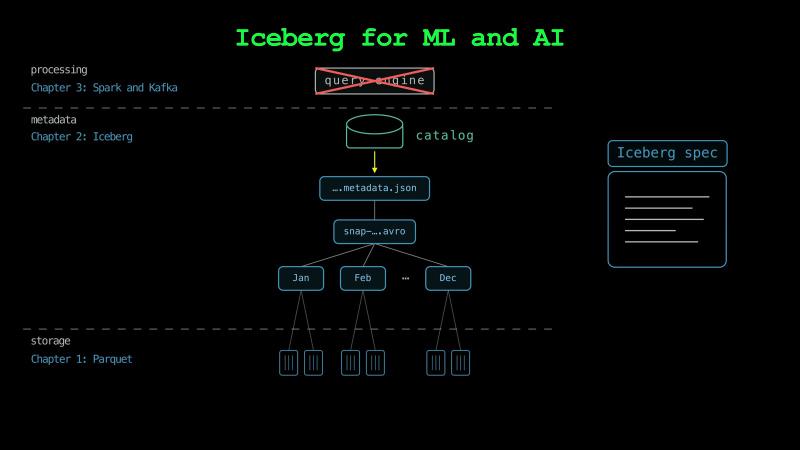
In the next chapter, we’ll see the compute layer: engines like Spark, Trino, DuckDB, and Polars that do the processing by following the specification, and systems like Kafka that stream the data.
See you there!
Taxi trip data from the NYC Taxi & Limousine Commission. Taxi emoji from Twemoji by Twitter, CC BY 4.0. Card photos, cropped and edited: Lipofsky Basketballphoto.com, CC BY-SA 3.0; Chrisa Hickey, CC BY 3.0; Foreign and Commonwealth Office, CC BY 2.0.