
Introduction#
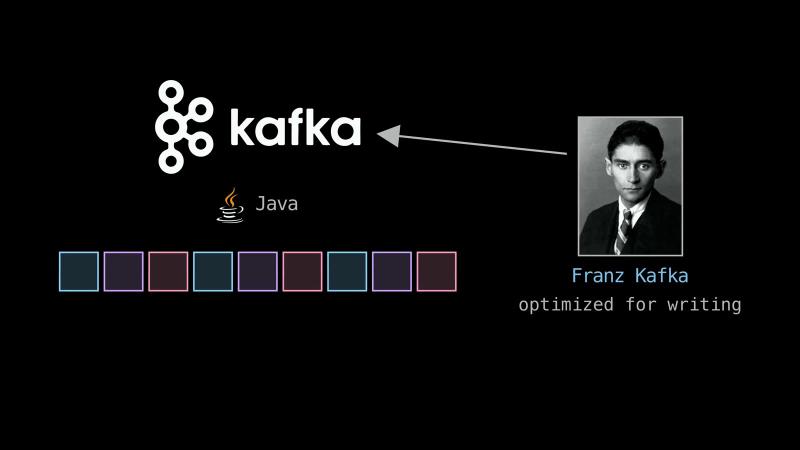
Because Kafka is optimized for writing, one of its creators named it after the writer Franz Kafka.
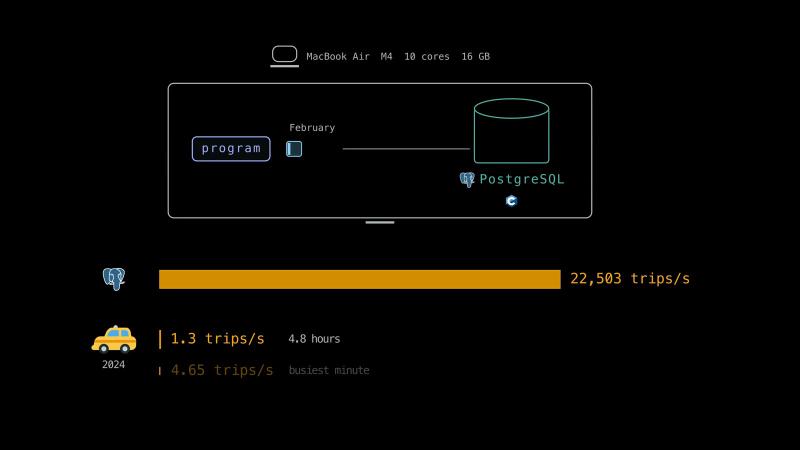
In 2024, New York’s yellow taxis averaged about 1.3 trips a second.
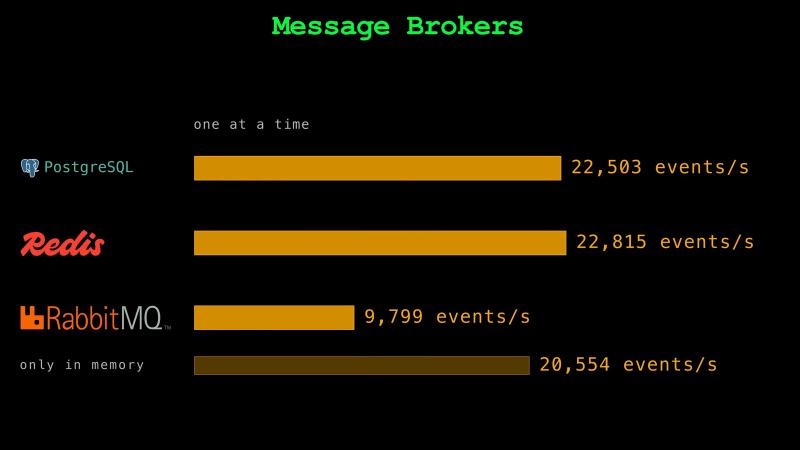
Our program sent February’s trips to one PostgreSQL database on our laptop. It sent one trip at a time. The database took about 23,000 trips a second. In one second, it took as many trips as the taxis finish in about 5 hours. One database could easily take the trips of every yellow taxi in New York.
Then why do teams run Kafka, RabbitMQ, or Amazon SQS?
When a Database Is Enough#
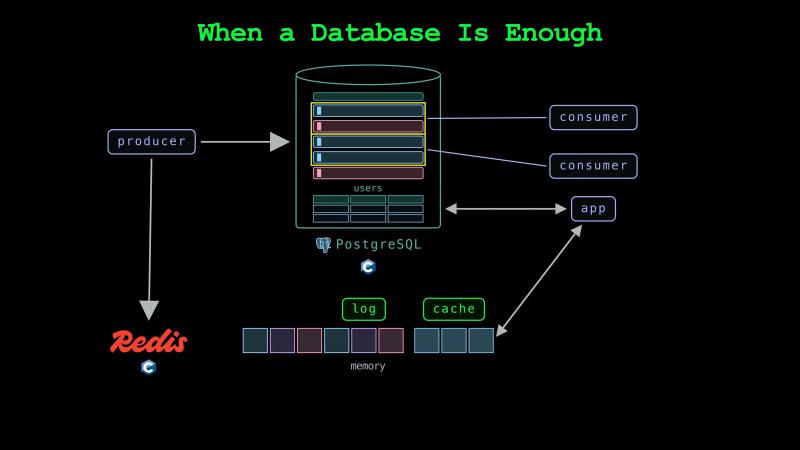
So far, our data was already in a table. How does data get into the table in the first place? Moving data from where it is made into storage is called ingestion. A taxi sends a record when a trip ends. A website keeps a record of every click. A record of something that happened is called an event. A program that sends events is called a producer. A program that reads them is called a consumer.
A small app can keep its events in a database that it already runs. PostgreSQL is a database that apps use to keep their data in tables. One of its tables can also work as a queue. Producers add events as rows. Each consumer locks the rows it takes. The other consumers skip the locked rows. Redis is a database that keeps its data in memory. Apps often use it to keep copies of data that they read often, which is called a cache. Redis can also keep events in a list that only grows at its end, which is called a log. Redis calls such a log a stream.
Message Brokers#
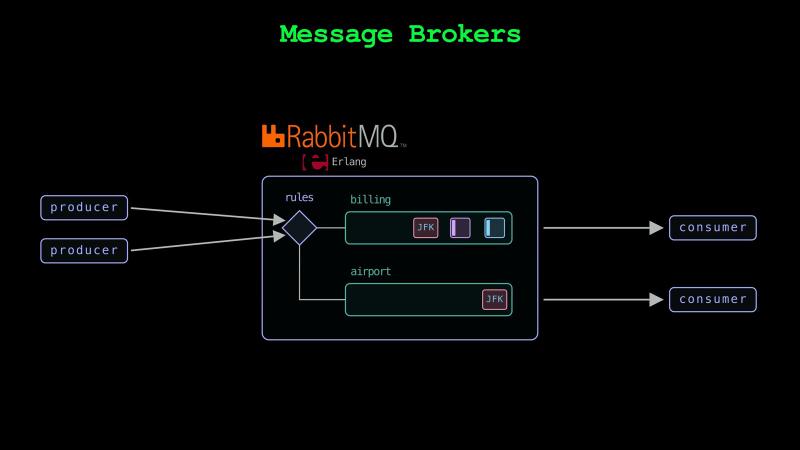
Producers send events to consumers through a program, which is called a message broker. Unlike PostgreSQL and Redis, RabbitMQ was built to be a message broker. It keeps events in queues. It sends each event in a queue to one consumer as soon as the event arrives. After the consumer handles the event, it sends RabbitMQ a reply, which is called an acknowledgment. Then RabbitMQ deletes the event. If a consumer stops before its acknowledgment, RabbitMQ gives the event to another consumer.
RabbitMQ also sends events to queues by rules that a team sets. For example, one rule can send every trip to a billing queue, and another can send only airport trips to a second queue.
We tested RabbitMQ on our laptop with its own test tool. The tool sent events of the same size as our trips. We asked RabbitMQ to write each event to a file before it answered. When the tool waited for each answer, RabbitMQ took about 10,000 events a second. When it kept the events only in memory, it took about 20,000.
Amazon SQS#
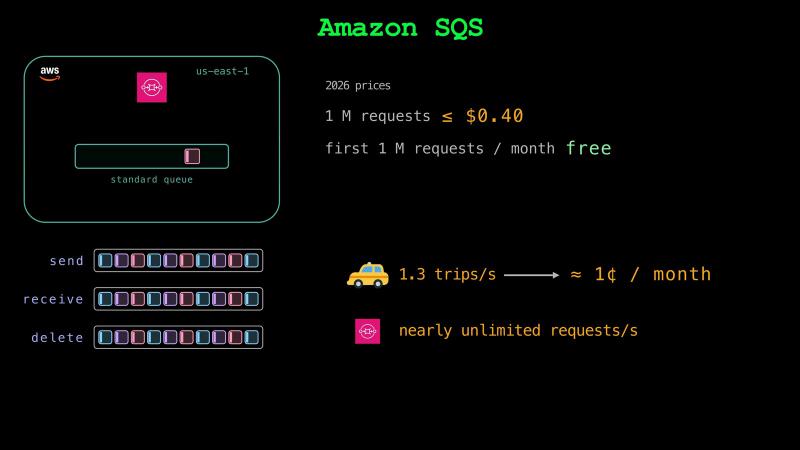
AWS runs a queue service, which is called Amazon Simple Queue Service, or Amazon SQS. It’s a managed service, so a team doesn’t need to run servers for it. A consumer receives an event, handles it, and then deletes it from the queue. By default, SQS hides a received event from the other consumers for 30 seconds. If the consumer doesn’t delete the event in time, another consumer can receive it.
At 2026 prices in the us-east-1 region of AWS, a million requests to a standard SQS queue cost at most 40 cents. The first million requests each month are free. One request can send, receive, or delete up to 10 events. At New York’s average trip rate, sending, receiving, and deleting the trips 10 at a time would cost about 1 cent a month. AWS says a standard queue takes a nearly unlimited number of requests a second.
Queues and Logs#
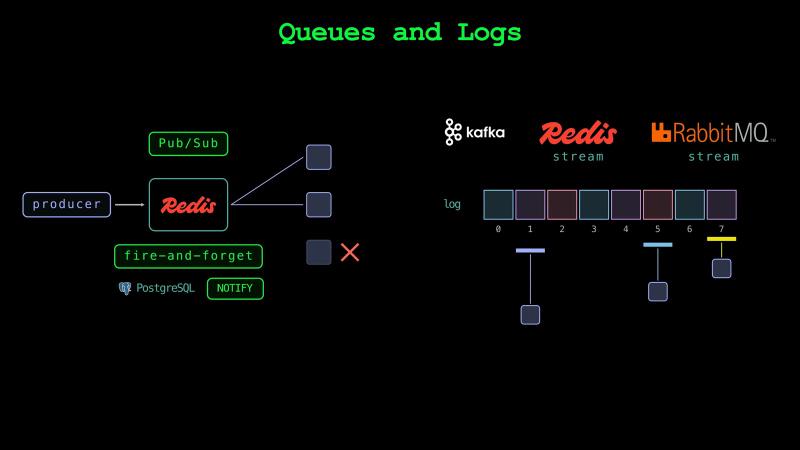
A queue deletes an event after one consumer has handled it. A log keeps its events after consumers read them. Because each consumer of a log keeps its own place, many programs can read the same events at their own pace. Kafka keeps its events in logs. Redis and RabbitMQ have logs too. Like Redis, RabbitMQ calls them streams.
Redis also has a feature called Pub/Sub, short for publish and subscribe. It sends each event to every program that is listening at that moment. Because it keeps nothing, a program that isn’t listening never gets the event. PostgreSQL’s NOTIFY works the same way.
Kafka is worth running when one machine can’t take all the events, or when many programs must read the events again days later.
How Kafka Works#
LinkedIn built Kafka in Java to collect the events of its website. It made Kafka open source in 2011. A running Kafka program is called a broker. A team usually runs each broker on its own machine. Kafka was built to take in events at a high rate. It keeps the events, so consumers can read them later at their own pace. Consumers on many machines can share the work of reading them. Kafka also keeps working when a machine fails.
Topics and Partitions#
Kafka keeps the events of one kind under one name, which is called a topic. Our taxi trips are one topic. A consumer reads only the topics it needs. If a topic is one log, one broker stores and sends all of its events. So, Kafka splits a topic into logs, which are called partitions. In Iceberg, a partition is a part of a table. In Kafka, a partition is a part of a topic. Different brokers keep different partitions, so producers and consumers can use many brokers at the same time. In each partition, every new event gets the next number, which is called its offset. Kafka keeps track of a consumer’s place with one number for each partition.
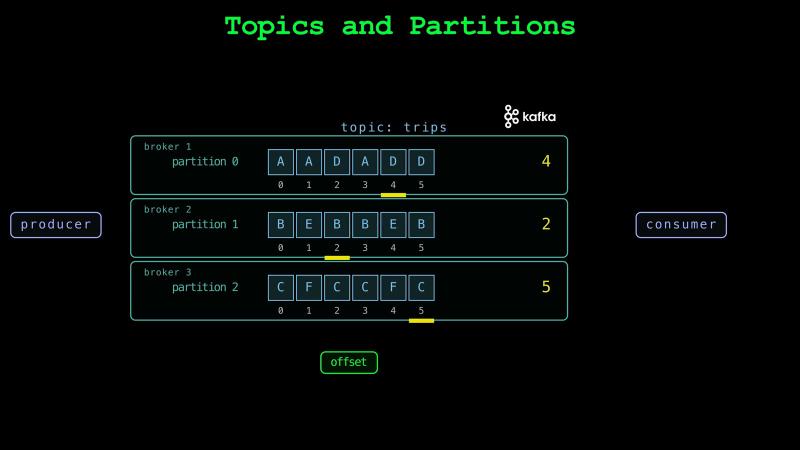
Kafka keeps events in order only within a partition. A producer sends the events with the same key to the same partition. Our producer uses the pickup zone as the key. Consumers read the trips of one zone in the order Kafka wrote them to the partition. Our topic has three partitions. Each partition holds the trips of many zones.
Consumer Groups#
A consumer reads a partition from an offset. It asks Kafka to save the offset of the next event to read. After a restart, the consumer continues from its last saved offset. Consumers can read a topic together as a group, which is called a consumer group. Each partition goes to exactly one consumer in the group. A group can read faster with more consumers until it has one consumer for each partition. With our three partitions, a fourth consumer in the group has nothing to read.
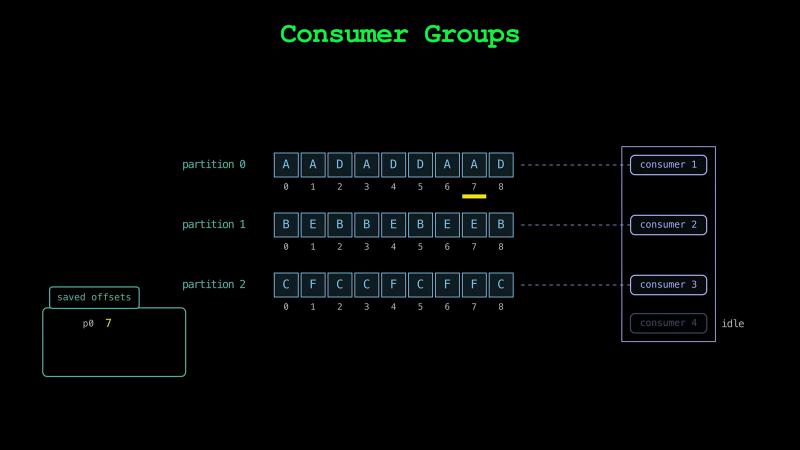
But since version 4.2, Kafka can also give the events of one partition to several consumers in a group, which is called a share group. A share group can have more consumers than the topic has partitions. Each event goes to one consumer. The consumer acknowledges the event. The event stays in the log.
Several consumer groups can read the same topic. For example, one group can write the trips to a table. Another group can send them to a fare model. Each consumer group keeps its own offsets. A new group can read the same events from the start without disturbing the others. Franz Kafka asked his friend Max Brod to burn his unpublished writings after Kafka’s death. Brod kept and published them. Like Brod, Kafka keeps events after every group has read them. Unlike Brod, it deletes them after 7 days by default. Until then, a consumer that stopped for a day can catch up.
How Many Partitions#
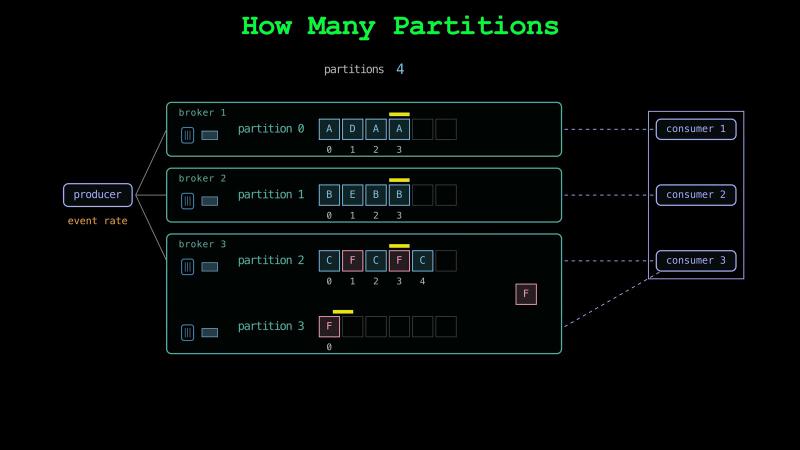
A team sets the number of partitions when it creates a topic. It picks enough partitions for the topic’s event rate and for the number of consumers it wants in each consumer group. More partitions let more brokers and more consumers share the work. But every partition takes files and memory on the brokers. It also adds work when a broker fails. A team can add partitions to a topic later, but it can’t remove them. Adding partitions changes where producers send new events for some keys. Because a key’s older events stay in its old partition, a consumer can then read that key’s events out of order.
Why Kafka Writes Fast#
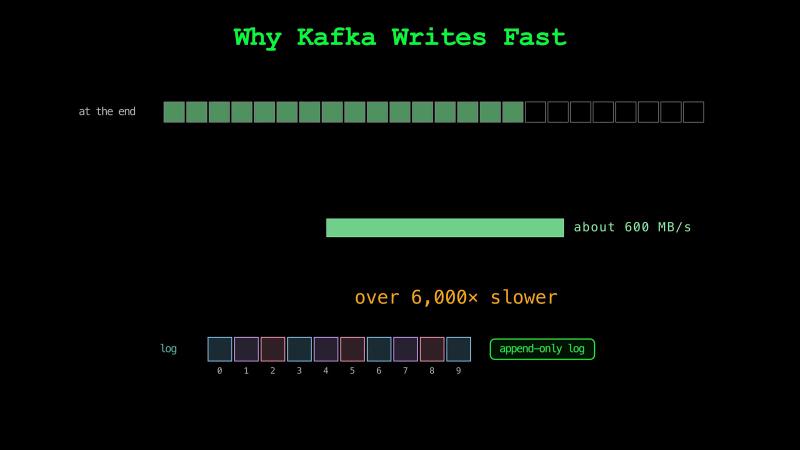
A hard drive writes faster at the end of a file than at random places. Kafka’s design notes describe six hard drives that wrote about 600 MB a second at the end of a file. At random places, the same drives wrote about 100 KB a second. Random writes were over 6,000 times slower. Kafka only adds events at the end of its logs.
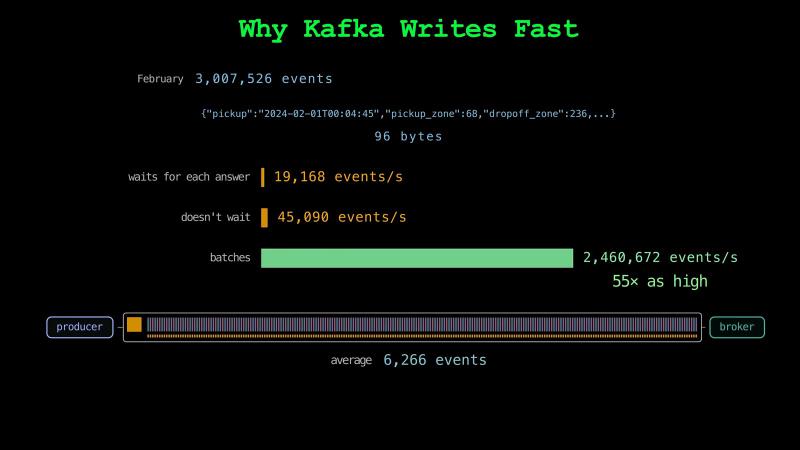
A producer sends events to a broker in requests. The broker adds the events to the end of a partition’s log. Then it sends back an answer that says it has them. By default, Kafka’s producer doesn’t wait for an answer before it sends the next request. Each request has a fixed cost for the producer and the broker. So, the producer collects events for a few milliseconds. It sends them as one batch in one request. The events in the batch share the request’s fixed cost. The broker adds the batch to the log in one write.
Our producer sends February’s 3 million trips. Each trip is about 96 bytes. When the producer waits for each answer before it sends the next event, it sends about 19,000 events a second. When it doesn’t wait and sends one event in each request, it sends about 45,000 events a second. With batches, each request carries about 6,300 events on average. The batched producer sends about 2.5 million events a second. Batching alone makes the rate 55 times as high. Because each event still costs some work of its own, the rate doesn’t grow 6,300 times.
A Partition on Disk#
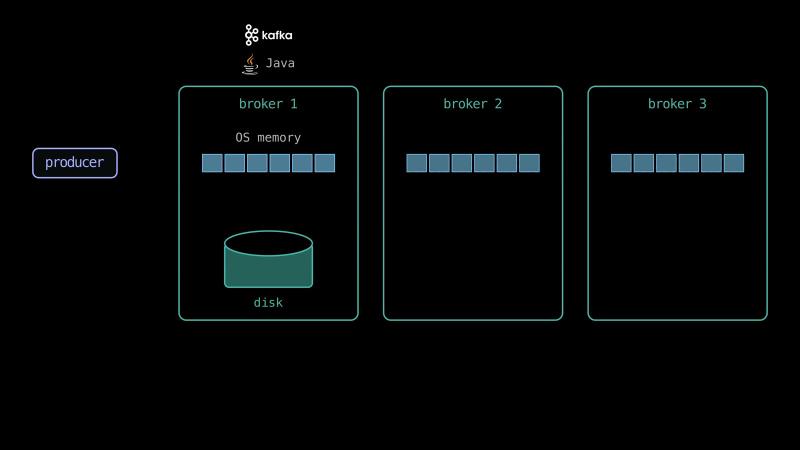
The broker writes each batch into the operating system’s memory. The operating system writes it to the disk shortly after. The broker can answer the producer without waiting for the disk. Until the disk has the events, Kafka can protect them with copies of each partition on other brokers.
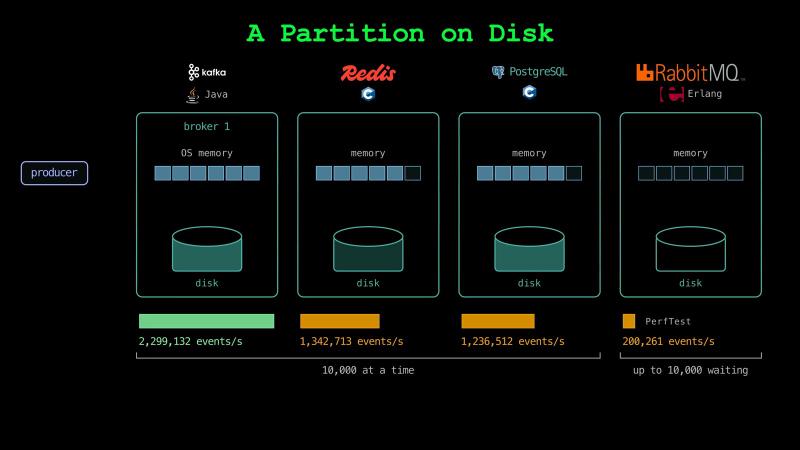
Redis keeps its data in memory. By default, it saves a copy of its data to the disk only from time to time. So, Redis also answers without waiting for the disk. With 10,000 events sent at a time, Kafka took about 2.3 million events a second. Redis took about 1.3 million. PostgreSQL waits for the disk before it answers. But events that arrive together share one wait for the disk. With the same batches, PostgreSQL took about 1.2 million events a second. With up to 10,000 events waiting for answers, RabbitMQ took about 200,000 events a second.
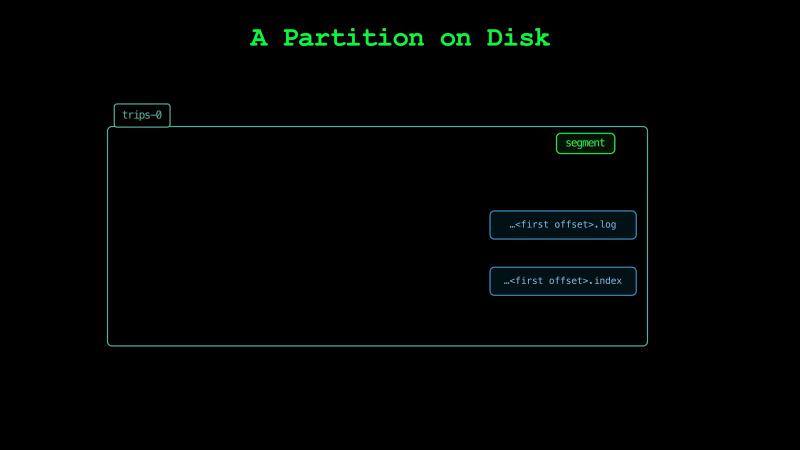
On the disk, each Kafka partition is a folder of files. Our first partition keeps about 1.1 million events in one file. The first event in the file has the offset 0. The file’s name is made from that offset. By default, Kafka starts a new file every gigabyte, or after 7 days. Each of these files is called a segment. Kafka deletes old events one whole segment at a time. It never rewrites a file to remove old events. Next to each segment, an index file lists where some of the offsets start. With it, the broker can jump near any offset and read from there.
Lost and Repeated Events#
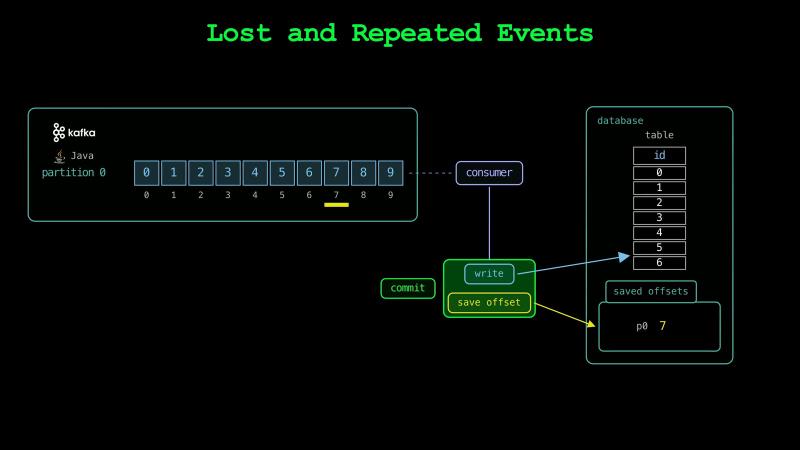
For each event, a consumer writes the event to a table and saves its offset in Kafka. It can do the two steps in either order. Each step is atomic. It happens completely or not at all. But the table and Kafka are separate systems, so a crash can come between the two steps. After a restart, the consumer reads from the saved offset. If the consumer saves the offset and then crashes before writing the event, it never writes the event. If it writes the event and then crashes before saving the offset, it writes the event again.
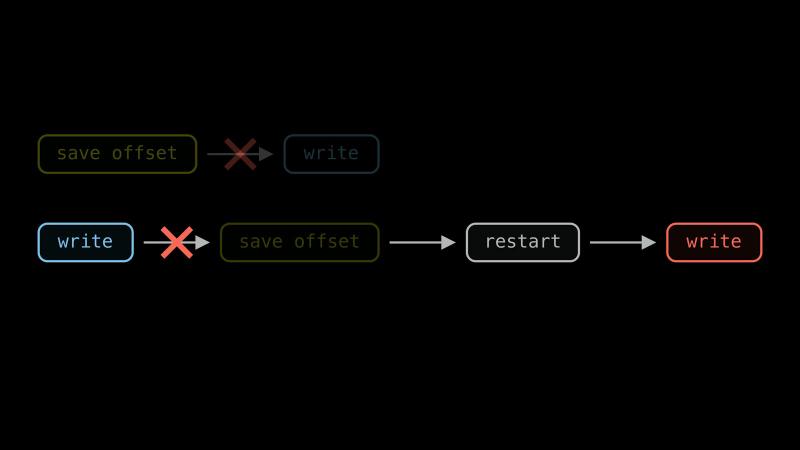
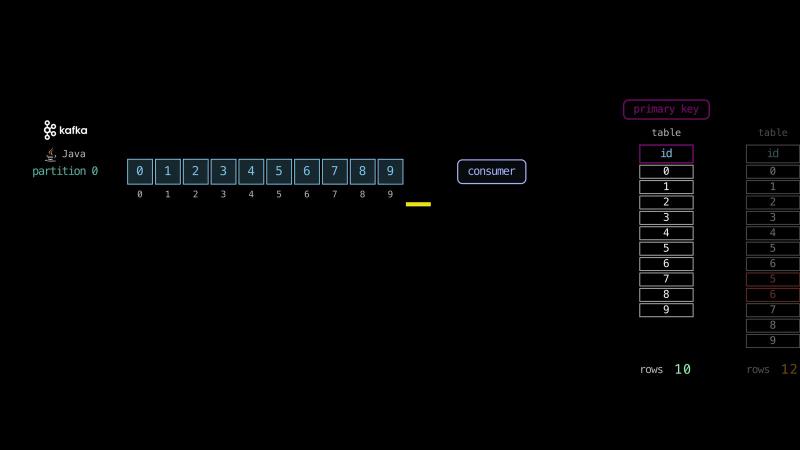
We tested both orders with 10 events. We numbered them 0 to 9. First, our consumer saved its offset after every 5 events that it wrote. It crashed after it had written 7 events. After the restart, it wrote events 5 and 6 again. The table had 12 rows. In a second test, our consumer saved offset 7 and crashed before it wrote events 5 and 6. After the restart, it read from offset 7. The table had 8 rows.
So, the order of the two steps decides whether a crash loses events or repeats them. A team picks the failure that its app can live with. A trip count on a dashboard can live with a lost event, but a fare payment can’t. A consumer can also save its offsets in the same database as its table, instead of in Kafka. Then one commit writes the events and their offsets together. A crash before the commit undoes both, so each event is written once.
A setup that never loses an event can still deliver an event twice. Delivery like this is called at-least-once delivery.
The program that writes the table must handle repeated events. Each event needs an ID that stays the same when the event is sent again. The table can use the ID as its primary key. Then the write skips an event whose ID the table already has. With the event ID as the primary key, our crash left 10 rows for 10 events.
Kafka and Friends for ML and AI#
Kafka delivers the events that a model needs within seconds. For a fare estimate, a model can use the trips of the last few minutes. Kafka can also deliver new documents to the search index of an AI assistant.
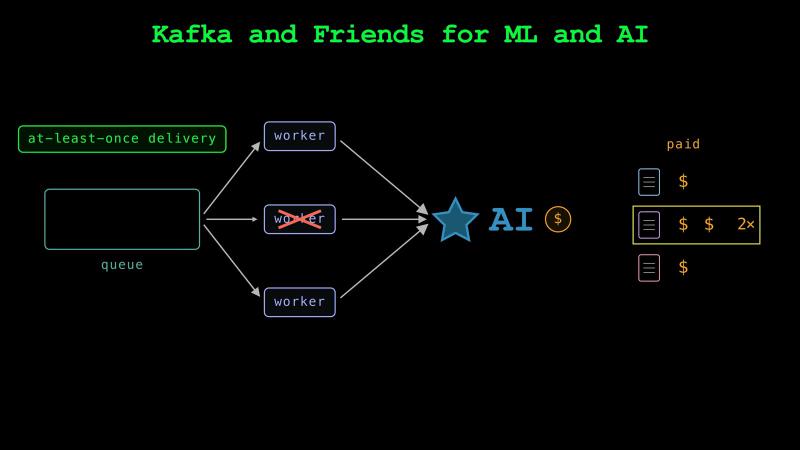
Many workers can take new documents from a queue and send each one to a paid AI model. With at-least-once delivery, an app can pay twice to process the same document.
We can ask an AI assistant for event IDs that stay the same when an event is sent again, and for writes that skip IDs already in the table.
Which One to Choose#
Kafka, RabbitMQ, SQS, Redis, and PostgreSQL now have many of the same features. Redis and RabbitMQ also have consumer groups. RabbitMQ can split one stream over several machines, which it calls a super stream. Redis is known as an in-memory database. But it can also write every change to a file and wait for the disk before it answers. All five can keep copies of their events on other machines.
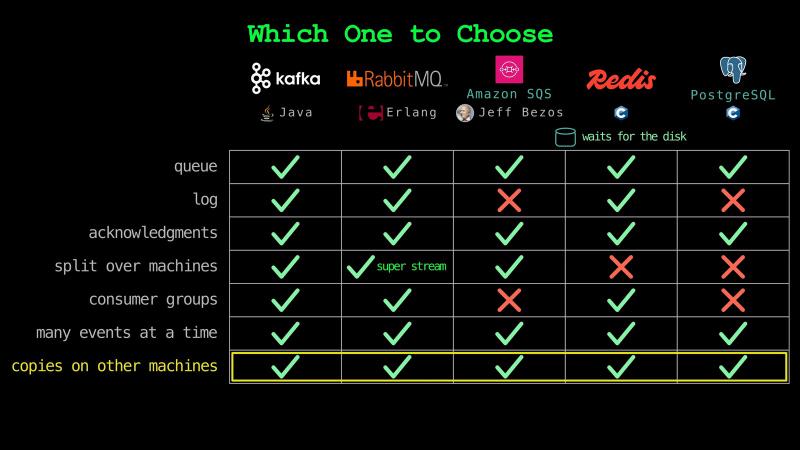
But Redis and PostgreSQL are databases first, not message brokers. Neither can split one stream or table over several machines on its own. So, a team usually chooses by its event rate and the systems it already runs. We can ask an AI assistant to use what we already run as long as one machine can take the events. We can ask for RabbitMQ when rules must send each event to the programs that need it. We can ask for SQS when we don’t want to run servers. We can ask for Kafka when one machine can’t take the events, or when many programs must read them again days later.
Up Next#
In the next chapter, we’ll take a look at orchestrating data pipelines.
See you there!
Taxi trip data from the NYC Taxi & Limousine Commission. Taxi emoji from Twemoji by Twitter, CC BY 4.0.