
Introduction#
This function computes the average fare of ten million taxi trips in New York.
import polars as pl

def average_fare(path: str) -> float:
    trips = pl.read_csv(path, columns=["fare_amount"])
    return float(trips.select(pl.col("fare_amount").mean()).item())
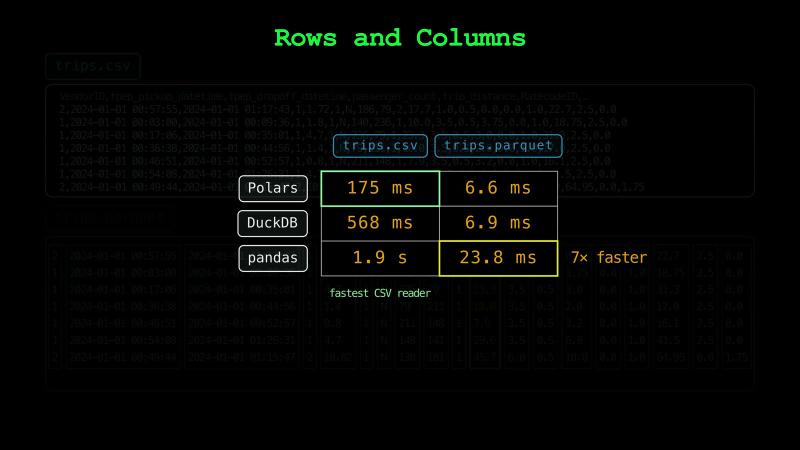
It reads the trips from a CSV file of almost a gigabyte, and it takes 175 ms.
Let’s change one line, so the function reads a Parquet file with the same trips.
import polars as pl

def average_fare(path: str) -> float:
    trips = pl.read_parquet(path, columns=["fare_amount"])
    return float(trips.select(pl.col("fare_amount").mean()).item())
The Parquet file is a sixth of the size. Also, this time the same function takes 6.6 ms. Not only do we have a smaller file, but reading the Parquet file is also 27 times faster.
Your favorite language model can easily write these functions. Yet, we choose how the data is stored. In this series, we learn how to make the right choice.
Many big tech companies use Parquet files heavily. Many of the datasets that AI models learn from are Parquet files too.
Let’s see what makes Parquet dominate modern data engineering.
Rows and Columns#
In general, file formats store a table in one of two ways. CSV, JSON Lines, and Avro store it row by row, which is called row storage. Parquet, ORC, and Feather store it column by column, which is called columnar storage.
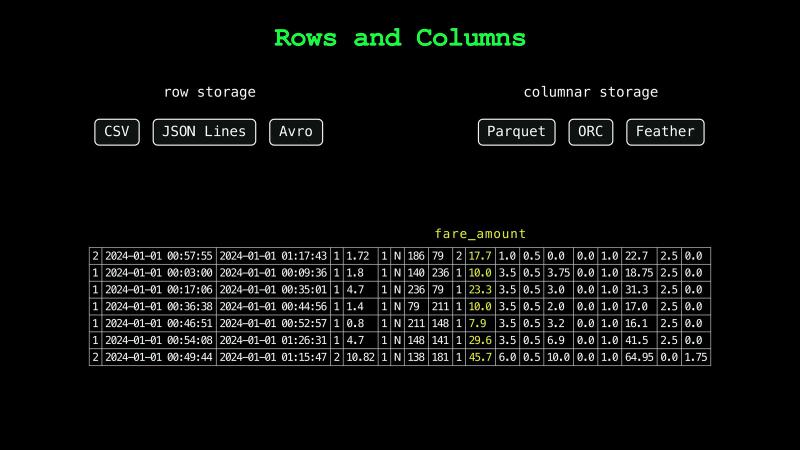
In our CSV file, each line holds one trip, and commas separate its 19 values. Because the values have different lengths, the fare isn’t at the same place in every line. So, a CSV reader can’t jump to the fares. It reads every character of every line and counts the commas to find the fare amount in each line.
Our Parquet file stores the same trips column by column. The fares are stored next to each other, apart from the other columns. So, a Parquet reader reads the fares and skips the columns it doesn’t need.
Most aggregations, filters, and training jobs read a few columns of many rows.
Polars has the fastest CSV reader of the three tools we tested. DuckDB takes more than three times as long to read the CSV file, and pandas takes more than ten times as long. We compare every Parquet read with the fastest CSV read. Even pandas reads the fares from the Parquet file seven times faster than Polars reads the CSV file. So, the speedup comes from the file format, and it holds for all three tools.
Types in the File#
A CSV file stores every value as text. A fare of $17.70 is written as 17.7, four characters: 1, 7, ., and 7. Turning these characters back into a number is called parsing. A CSV reader parses every fare on every read.
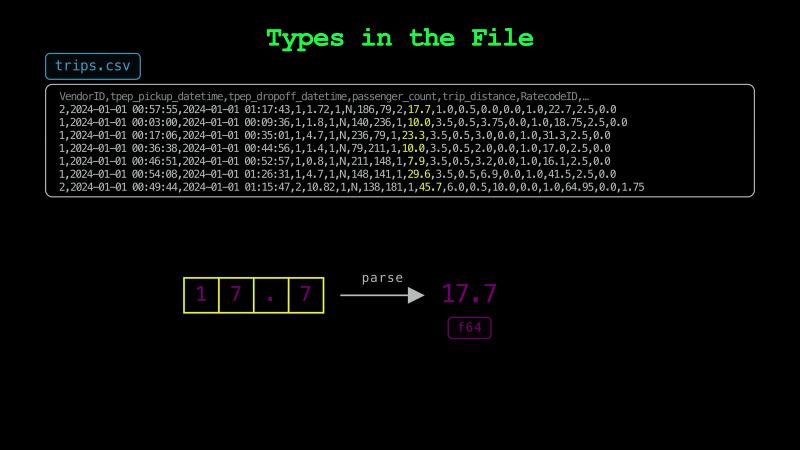
A CSV file also doesn’t store the type of each column. By default, a reader guesses each type from the first values it reads, which is called type inference.
The guess can be wrong. PyArrow is the official Python library for Apache Arrow. It has fast tools that use little memory to process, store, and move large datasets. PyArrow writes a fee of one dollar as the digit 1. It leaves out the decimal point. Polars reads that file and checks the first 100 rows. It finds only whole numbers there, so it treats the column as integers. About 77,000 rows later, it reaches a fee of 30 cents, and the read fails.
This would not be a problem with Parquet. A Parquet file stores the type of each column in the file. So, a Parquet reader doesn’t have to infer the types.
The Parquet Footer#
But where does a Parquet file keep all of this information?
A Parquet file starts with four bytes that spell PAR1. The data of the columns comes next. After the data, the writer adds a section called the footer. The file ends with the footer’s length and PAR1 again.
The footer lists every column with its name and its type. It also records where the data of each column starts in the file. Because the writer knows where each column starts only after it writes the data, it writes the footer last.
A Parquet reader first reads the last eight bytes, and then it reads the footer. In our file, the footer takes 26 KB of the 158 MB. The footer is written in a compact binary format called Thrift.
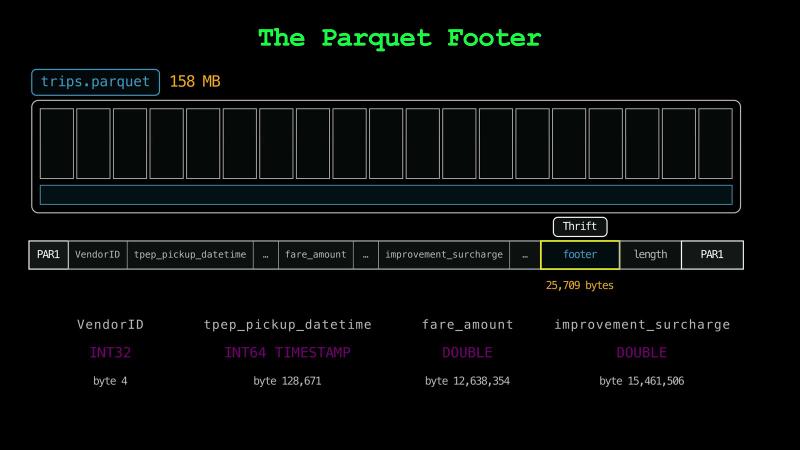
This is how a Parquet reader gets every type from the footer, and it reads each number from its bytes without parsing any text.
Encodings#
Why is the Parquet file six times smaller?
In a column, values of the same kind are next to each other, and many of them can repeat. Writing values in a smaller form that turns back into exactly the same values is called encoding. Our file uses three kinds of encoding.
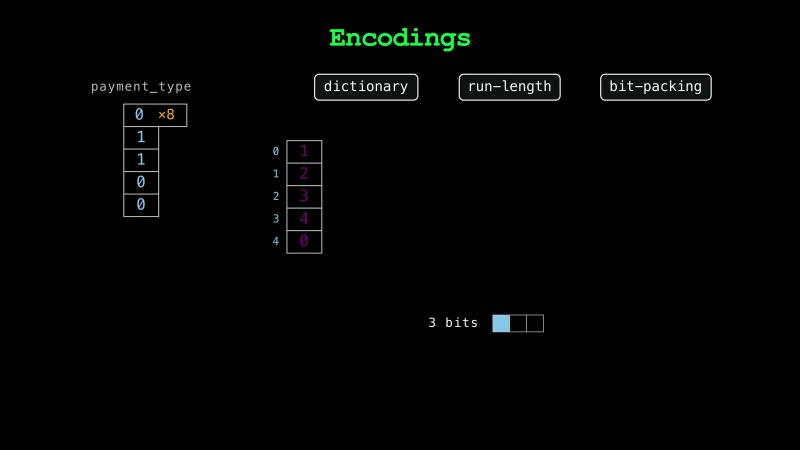
The payment type column of the dataset has only five different values. First, Parquet writes each of the five values once in a short list. For each row, Parquet then stores the position of its value in that list. Replacing values with positions in a list is called dictionary encoding.
Second, when the same position repeats many times one after another, Parquet writes it once with the number of repeats, which is called run-length encoding.
Third, five different position values can each fit in three bits instead of 64 bits. Parquet can do this by packing each position into as few bits as it needs, which is called bit-packing.
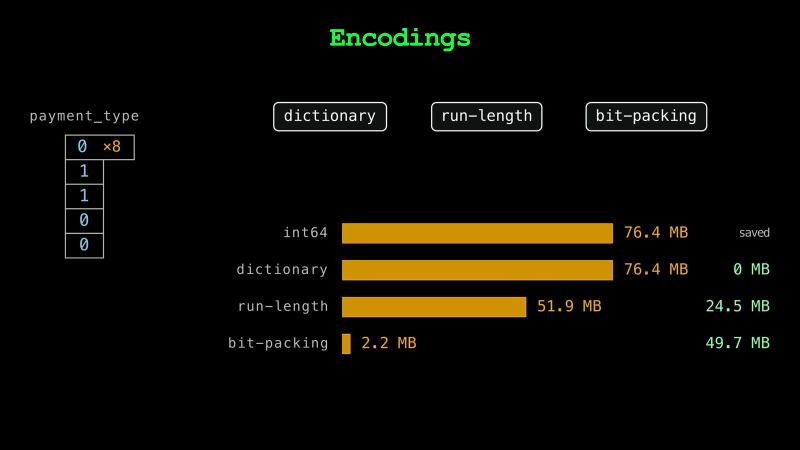
As plain 64-bit numbers, the payment types would take 76 MB. After the three encodings, they take 2.2 MB. For the payment types, the dictionary alone saves nothing, because a position takes as many bytes as the value it replaces. Even if each payment type were stored as a 32-bit number, the three encodings would still save 94 percent of the space.
Pages#
Where do the encoded values go in the file?
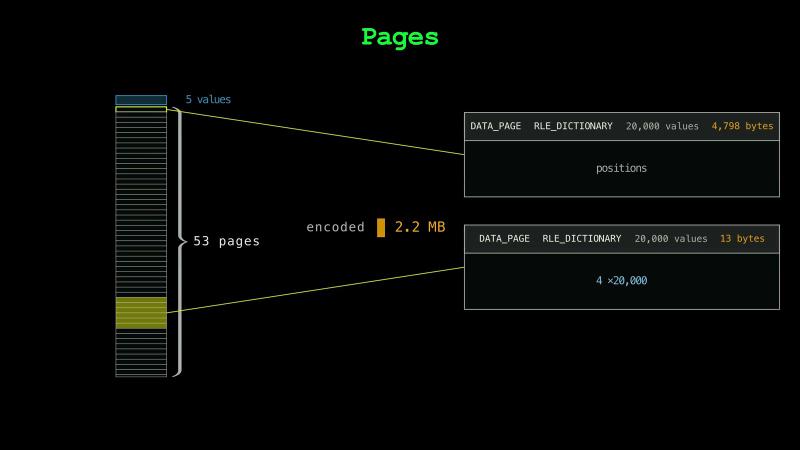
Parquet splits each column into pages. In our example column, one group holds about a million payment types. Its first page holds the list of five values, and the next 53 pages hold the positions. PyArrow puts up to 20,000 positions in a page by default.
Each page starts with a short header. The header says how the page is encoded and how many bytes it takes. When 20,000 consecutive payment types are the same, a page holds one run, and its data takes 13 bytes before compression.
Compression#
So far, we’ve seen how Parquet encodes the data to make it smaller. This is separate from the compression step, which makes the bytes of each page even smaller.
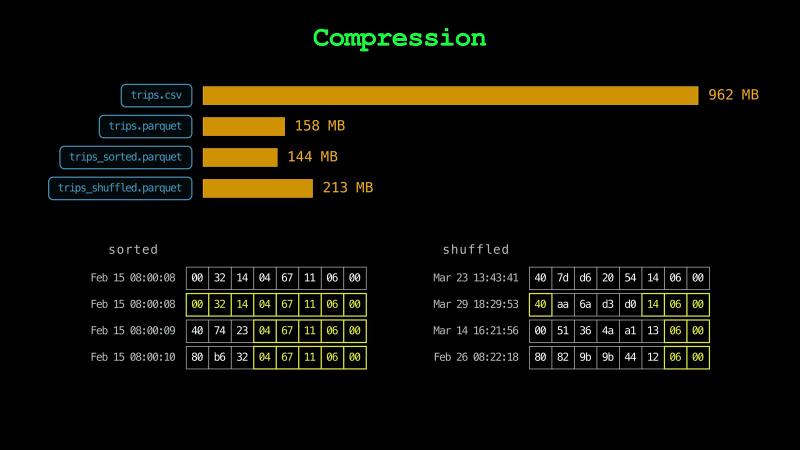
A general compressor called Zstandard compresses each page on its own. A reader can decompress one page without the others. Zstandard further brings the payment types from 2.2 MB down to 1.2 MB.
Parquet can use other compressors too. Polars uses Zstandard by default, but PyArrow and DuckDB use Snappy. Zstandard writes our file almost as fast as Snappy, and the file is a fifth smaller. Gzip and Brotli can make files even smaller. But with PyArrow’s default settings, Gzip takes almost 30 times as long as Zstandard to write the file, and Brotli takes two and a half times as long to read it.
When the file is in memory, Zstandard makes reading every column about 24 ms slower than the uncompressed version. But over any network slower than about 25 gigabits per second, the 91 MB it saves take longer to arrive than Zstandard takes to decompress the file. So, compression also makes reads faster when files come over a network.
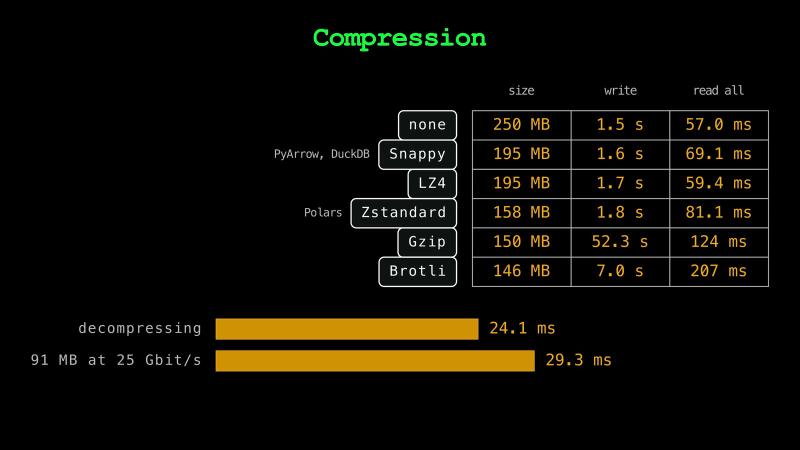
You should choose a compressor that balances read speed, write speed, and storage size for your application.
The order of the rows changes the size too. When the rows are sorted by pickup time, almost every pickup time is within a few seconds of the one before it. The times next to each other share most of their bytes, and Zstandard compresses them well. The sorted file takes 144 MB. When the rows are shuffled, the file takes 213 MB.
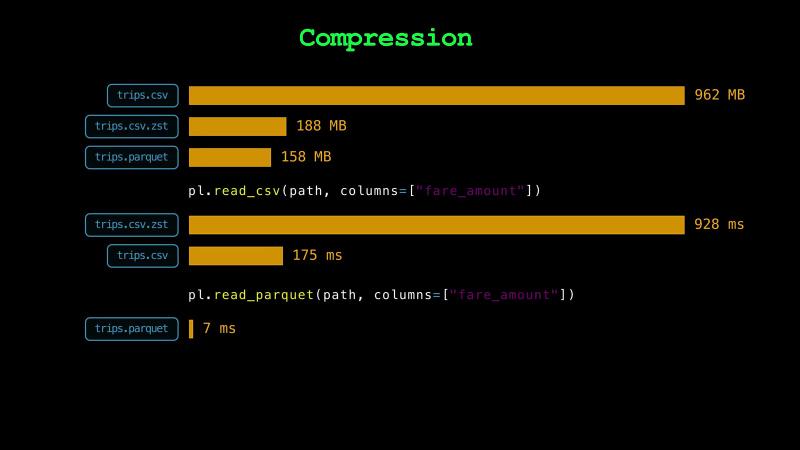
Instead of all the encoding tricks that Parquet does, couldn’t we compress the CSV file?
We certainly could. Python 3.14 includes Zstandard in its standard library. With it, the CSV file shrinks to 188 MB. Our Parquet file takes 158 MB. But to read the fares, a reader still decompresses every line and parses it. Reading the fares from the compressed CSV takes five times as long as reading them from the plain CSV. Yet, reading the same column from the Parquet file takes 7 ms.
Predicate Pushdown#
We saw that a Parquet reader skips the columns it doesn’t need. Can it skip rows too?
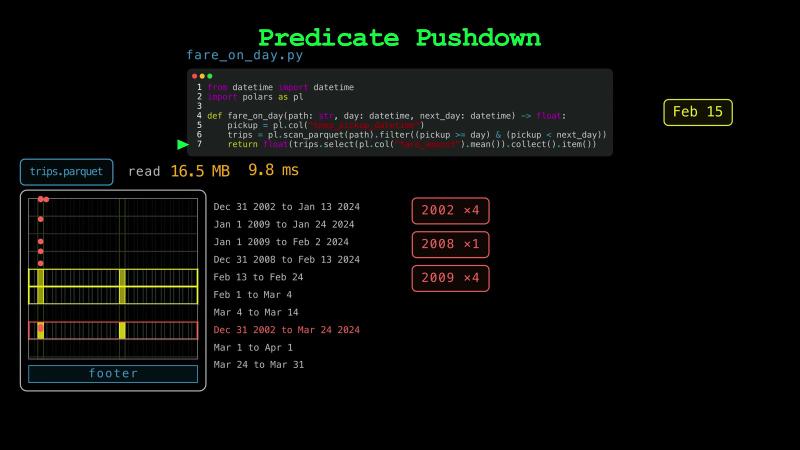
Parquet files split their rows into groups, which are called row groups. Inside each row group, they store the columns one after another. Our trips file has ten row groups. For each column in each row group, PyArrow writes the smallest and the largest value into the footer.
Suppose we want the average fare on February 15. For each row group, the footer has the earliest and the latest pickup time. When February 15 is outside that range, the reader skips the row group without reading it. The filter on the day is called a predicate, and providing it to the reader is called predicate pushdown.
from datetime import datetime
import polars as pl

def fare_on_day(path: str, day: datetime, next_day: datetime) -> float:
    pickup = pl.col("tpep_pickup_datetime")
    trips = pl.scan_parquet(path).filter((pickup >= day) & (pickup < next_day))
    return float(trips.select(pl.col("fare_amount").mean()).collect().item())
When the trips are sorted by pickup time, February 15 is inside the range of one row group. The reader reads one row group out of ten. When the trips are shuffled, every row group holds trips from every day. The reader reads all ten. It reads 20 times as many bytes, and it takes almost twice as long. So, it’s important to sort by the column that the queries filter on most.
A few wrong values may not matter for a machine learning model, but they can keep a row group from being skipped. In our data, nine of the trips have pickup times from 2002, 2008, and 2009. Our file keeps the order in which New York published the trips, and two of the nine are in a row group of March trips. The footer stores a range from December 2002 to March 2024 for that row group. The reader can’t skip it, and it reads a whole row group of March trips to find one day in February. So, cleaning your data can also be important from an engineering perspective.
Row Group Size#
How many rows should a row group hold?
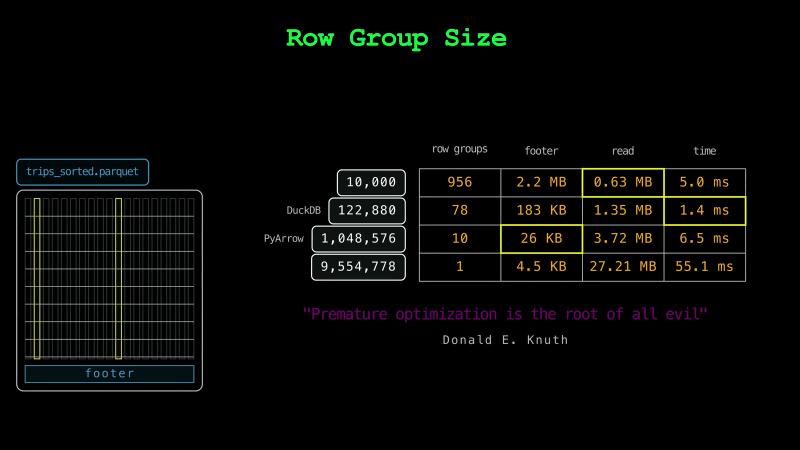
The row group size is a setting of the writer. PyArrow puts about a million rows in a row group, and DuckDB and Polars put about 120,000.
Smaller row groups let a reader skip more precisely, but each row group adds its ranges to the footer, and a reader reads the whole footer first. With row groups of 10,000 rows, our sorted file has 956 of them, and the footer grows from 26 KB to 2.2 MB.
Larger row groups keep the footer small, but they skip less. With one row group for all the trips, the reader reads 27 MB to find one day, and it takes 55 ms.
As a data engineer, you should understand the needs of your application and decide on these settings. But usually, the default values of popular writers work well.
“Premature optimization is the root of all evil.” Donald E. Knuth
A Short History#
Where did Parquet come from?
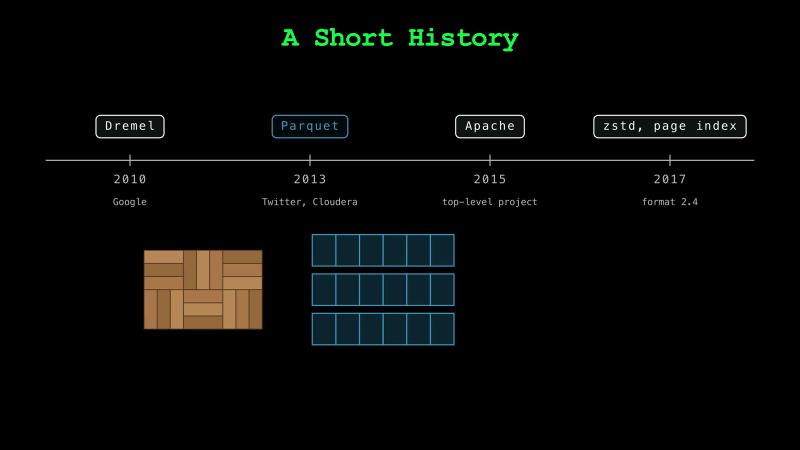
In 2010, Google described a system called Dremel, which stores records column by column. In 2013, engineers at Twitter and Cloudera built Parquet on the same idea for Hadoop. Hadoop stored and processed data on many machines. It read the data from their local disks, and reading from disk was the slow part. So, a reader that reads only the columns it needs reads less from the disk. The name comes from parquet floors, which are made of small blocks of wood laid in a pattern, like the row groups and columns of a Parquet file. Parquet became a top-level Apache project in 2015. Zstandard and an index for skipping pages were added in 2017.
You may hear about Parquet “version 2,” which means two different things. The format version sets which types a file can hold, such as timestamps in nanoseconds. Files of both format versions start and end with PAR1. The page version sets how a page is laid out, and version 2 pages keep the marks for missing values outside the compressed part. Our file uses format version 2.6 with version 1 pages, which are PyArrow’s defaults.
Row Storage vs. Columnar Storage#
Is columnar storage always the better choice?
A database is an organized collection of data. Our CSV and Parquet files are databases too. To the operating system, they are only bytes. Programs that store and read databases, like SQLite and DuckDB, are called database management systems, but people simply call them databases instead. SQLite stores each table row by row, and DuckDB stores each table column by column. Each of them keeps a whole database in one file.
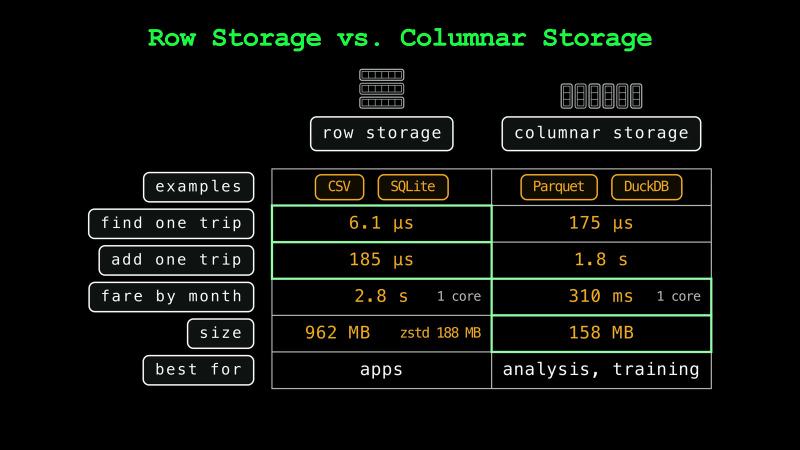
An app that shows one trip needs all 19 values of one row. In row storage, those values are next to each other. SQLite finds a trip by its number in about 6 µs, and DuckDB takes 29 times longer.
Rows are also faster for adding one trip. SQLite adds a row and saves it in about 0.2 ms. PyArrow, Polars, and DuckDB can’t add rows to a finished Parquet file. Adding one trip to our Parquet file means writing the whole file again, and writing it takes almost two seconds.
For the average fare of every month, the result is the other way around. DuckDB reads only the two columns it needs, and it answers 49 times faster than SQLite. DuckDB also uses every core of the processor, and SQLite uses one. On one core, DuckDB is still nine times faster.
Columns also take less space. Our Parquet file is a sixth of the size of our CSV file, and smaller than the compressed CSV too.
So, rows work best for apps that read and write one row at a time. Analysis and training read many rows at once, so columns work best for them. Hugging Face hosts many of the datasets that models are trained on, and it converts the public ones to Parquet. Because the taxi data is large, New York publishes it as Parquet files too.
Recap#
In this chapter, we saw what makes Parquet so popular in modern data engineering.
But as Parquet spread, object storage like S3 started to hold many unorganized Parquet files.
In the next chapter, we’ll see how Iceberg keeps thousands of Parquet files together as one table.
See you there!
Taxi trip data from the NYC Taxi & Limousine Commission. Taxi emoji from Twemoji by Twitter, CC BY 4.0.