
Introduction#
In technology, something has been doubling every two years. If you think it’s the number of transistors on a chip, also known as Moore’s Law, think again. Despite incredible engineering efforts, scaling has slowed, and we have fallen behind Moore’s schedule.
But people also had other ideas to make computers faster (pipelining, caches, out-of-order execution, branch prediction, speculative execution, SIMD, and many more). These techniques were designed to be hidden from the average developer, and for the most part, they still are. However, with threads and multicore processors, another Moore’s Law started to emerge, this time in the amount of complexity and confusion developers face.
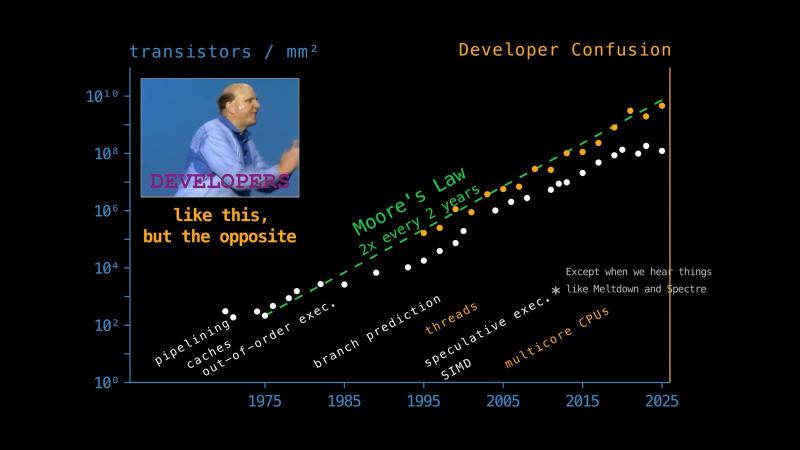
The concurrency lobby quickly discovered they could trade developer sanity for performance. So today we live in a world dominated by concurrency and parallelism, which are loosely defined as handling and doing many things at once. We can also think of concurrency as an umbrella term that includes parallelism.
Going back to the confusion levels, developers in high-level languages like Python have it worst. The important ideas surrounding concurrency already assume you understand some lower-level concepts: the operating system and its kernel, system calls, processes, threads, intra- and inter-process communication. Yet, you will also need higher-level Python concepts like coroutines and event loops, pickling data between processes, and the infamous Global Interpreter Lock, or GIL. The GIL gets a lot of hate, but it was probably a trade worth making. It made parallelism harder for Python users, but it kept CPython simple for the core developers who grew the language, and it kept single-threaded code fast.
This is a lot, but fear not. Today we are going to learn how to conquer concurrency. We will see how computers run our code, sequentially and in parallel, and when to use Python’s asyncio, threading, and multiprocessing modules.
How the Operating System Works#
The fundamental computing model is a sequential machine that runs one instruction at a time and understands only 0s and 1s. As users, our goal is to run programs on computer hardware: the CPU, memory, GPU, and input/output (I/O) devices like the disk, network card, keyboard, and mouse. But talking to hardware directly is hard, and a mistake can even cause damage. So there’s another software layer between the user and the hardware, called the operating system.
At the heart of an operating system, there is a part that is closest to the hardware, called the kernel. Every time the user needs to interact with the hardware, the request goes through the kernel. The kernel is also just software. For example, the Linux kernel is written mostly in C (you’ll also see some other languages on the Linux GitHub repository like Python, but Python in there is a collection of development infrastructure; the kernel itself does not embed or require Python). Operating systems built on the Linux kernel are called Linux distributions (distros for short) like Ubuntu, Debian, Arch, and Kali Linux. Apple and Microsoft operating systems like macOS and Windows have their own kernels, also written mostly in C and C++.
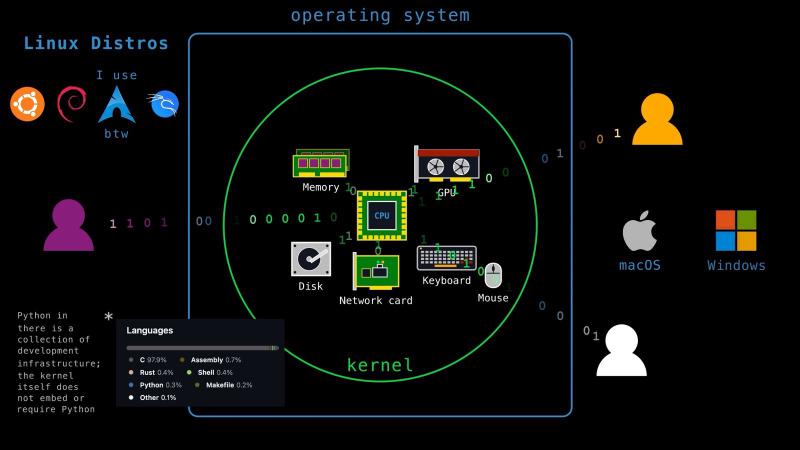
Telling users only to use the kernel to interact with the hardware is not enough; the users can still try to be sneaky. That’s why, for protection, the CPUs operate in two execution modes: user mode and kernel mode. When the CPU runs in user mode, it can only execute instructions that can’t do anything dangerous. This includes copying data, doing arithmetic and logical operations, and control flow. When the CPU runs in kernel mode, it can execute anything in its instruction set including things like managing memory and communicating with I/O devices.
To let users run privileged instructions, the kernel provides an API. The set of such functionality is called the system call interface. Making a system call changes the CPU into kernel mode, the kernel does the work, and control comes back to the user. Reading and writing data (read, write), and asking which connections are ready (select), are all system calls. So, in Python, every time you open a file or read from a socket, a system call is performed underneath.
With that, we are ready to talk about two of the most fundamental ideas in computing: processes and threads.
Processes vs. Threads#
A program in execution is called a process. Whenever you click and launch an application, or you execute some code, the OS creates a process for you and assigns a process ID. Each process gets its own address space, divided into text, data, stack, and heap sections. Text holds your program’s code. Data holds your global variables and constants. Stack and heap are where your local and dynamic data lives. A process also owns resources like open files and hardware devices. Finally, each process has its own CPU state, meaning the register values it was last running with. Together, all of this is its execution context.
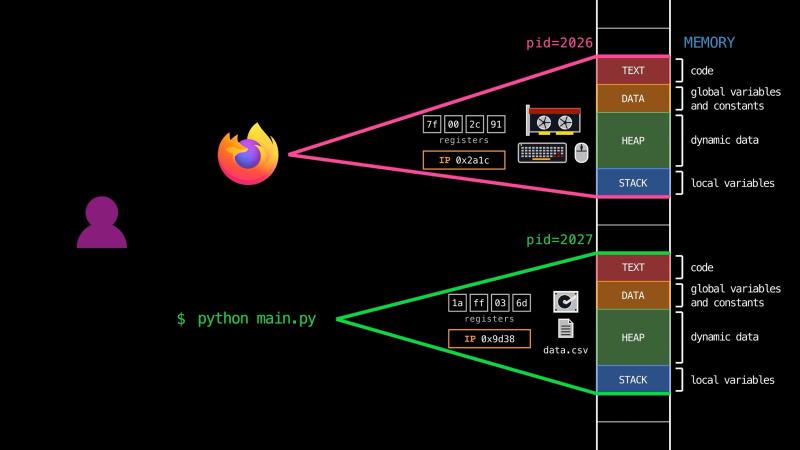
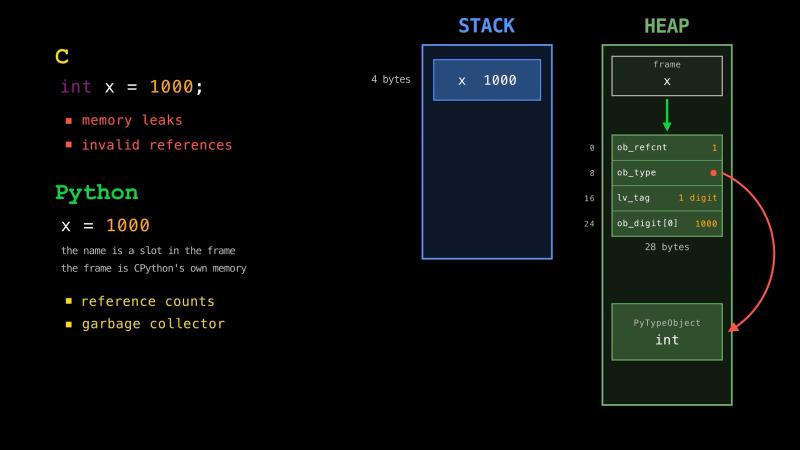
What does a Python process look like? Do you think the Python code you write goes into the text section? We just said that’s where code normally lives, but that’s not true for Python, or for interpreted languages in general. The most common implementation of Python is written in C. So the text section of your CPython process holds compiled C code, not your Python code. CPython reads your source from the .py file, parses it, builds an abstract syntax tree, and compiles it to bytecode. Bytecode is a set of instructions for CPython’s virtual CPU, much like assembly is for your actual CPU. Your functions, classes, and data end up on the heap, not in the text section and not on the stack.
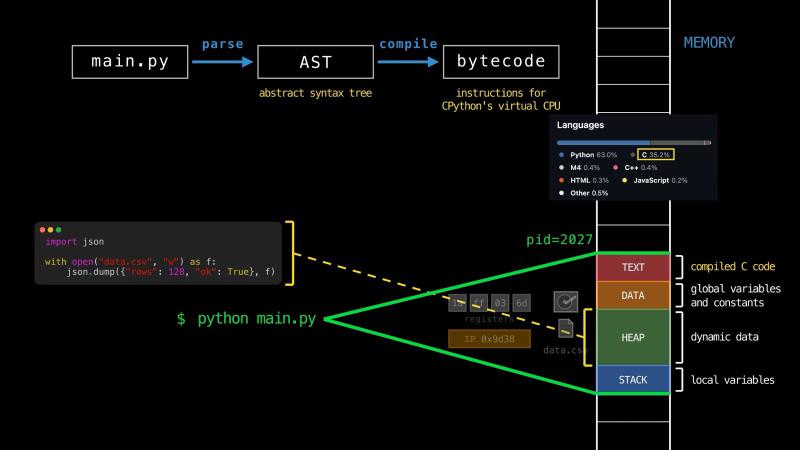
The stack memory is fast and simple. Each function call pushes a frame holding its local variables, and popping that frame when the function returns is nearly free. It also stays packed together, so its data is more likely to be accessed quickly from memory. But it is small, and sizes have to be known up front, so anything large or dynamically sized goes on the heap instead. The heap allows dynamic sizes and large allocations, but it costs more. The memory allocator has to find a free block, it sometimes has to ask the kernel for more memory with a system call, and that memory has to be tracked and released separately.
This is part of what people mean when they say Python is slow. In C, a local integer is a few bytes on the stack, and reading it is immediate. In Python, the same integer is an object on the heap, so accessing and manipulating it is far more indirect, and objects spread across the heap are less likely to be accessed quickly from memory. In exchange, Python manages that memory for you (reference counts, garbage collector), so the memory leaks and invalid references you would handle manually in C are not your problem.
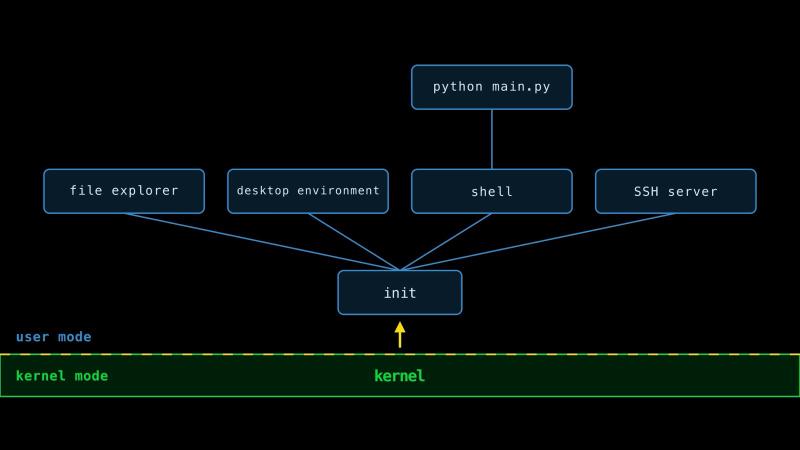
For a user, creating a process needs privileged instructions, so it goes through a system call. The details differ across operating systems. For example, on Linux, a process copies itself (fork) and then replaces the copy with a new program (execve), whereas on Windows, creating a process is more direct (CreateProcess). But fundamentally every user process is created by another user process. That implies a single ancestor, called the init process. It is the only user process created by the kernel itself rather than by another process. When you boot your computer, the kernel loads into memory first, then calls the init code of the OS. This is where you draw the line between the OS and its kernel. Everything else is a descendant of init. Your file explorer, desktop environment, shell, and SSH server are all launched by the OS, which means most of what you interact with runs in user mode, not kernel mode.
Because each process has its own address space, a program built from multiple processes needs a way for them to communicate. This is inter-process communication, or IPC, and it is done with pipes, sockets, or a shared memory region. You usually get high-level APIs for these, so you don’t need to implement them yourself. For example, in Python, multiprocessing pickles your objects, turning them into bytes, and sends them through a pipe. That is why anything you pass between processes has to be picklable. Forking is an exception: the child shares the parent’s memory until something writes to a page (copy-on-write, or COW). In Python, that saves less than you would hope, because touching an object writes to its reference count, and so does garbage collection (gc.freeze). Immortal objects like small integers and None are the ones that really stay shared.
Creating processes and communicating between them are both slow and complex. So in the 1990s, a lighter version of a process, called a thread, became popular. A process has at least one thread (the main thread) and can have many more, all sharing the same address space. Each thread keeps only the bare minimum needed for its own execution context (a stack and a set of registers, including the instruction pointer that tracks where it is in the code). Everything else is shared (text, data, heap, open files, and hardware resources). That makes threads faster to launch and communication easier, since any thread can read and modify the same object on the heap.
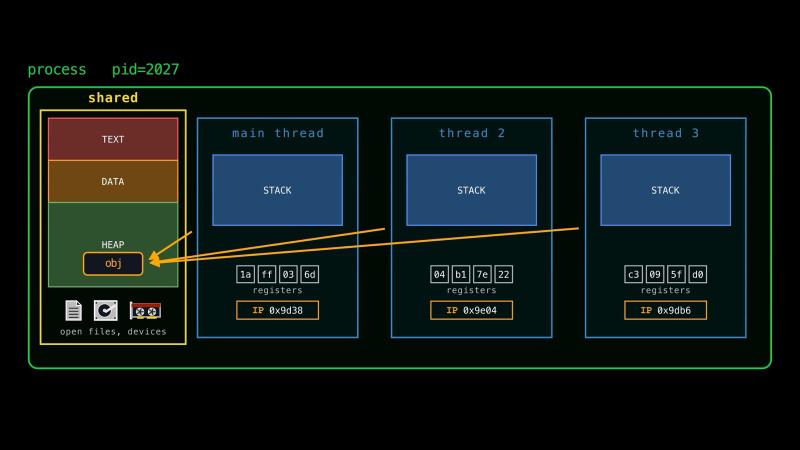
Sharing an object between execution contexts, whether threads or processes, brings its own problems, most notably race conditions. Instructions that modify an object are not necessarily atomic, so if an execution context is paused halfway through, the result can be wrong. And the timing is not up to you: a hardware timer interrupt can stop a thread between any two instructions, so the OS can give the CPU to someone else. Locks are the usual fix. Only the context holding the lock may touch the object. In modern computers, this is one of the problems software cannot solve alone: a lock needs an atomic instruction like test-and-set or compare-and-swap, which the CPU guarantees cannot be interrupted halfway.
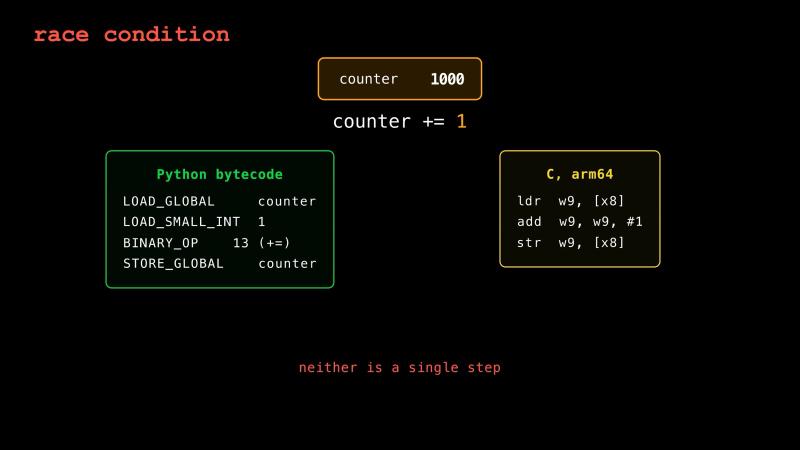
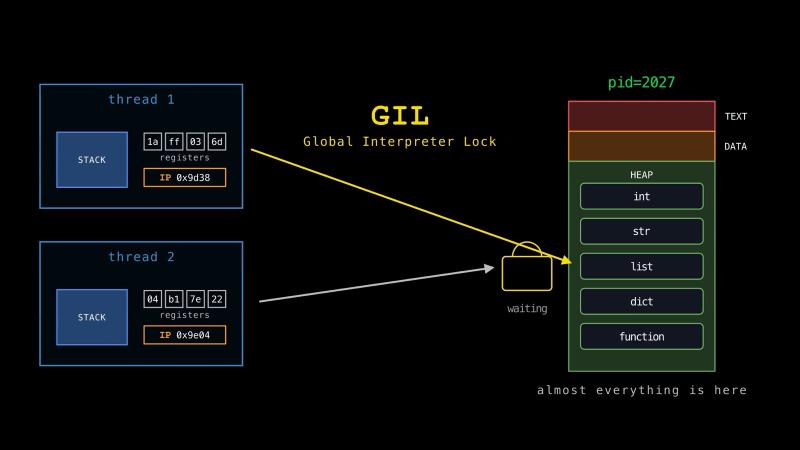
In Python, this matters more than usual, because almost everything lives on the heap. Nearly all of your data is shared between threads by default, including every object’s reference count. That is the reason the Global Interpreter Lock exists. Instead of a lock per object, CPython puts one lock around the whole interpreter. A thread has to hold the GIL to run any bytecode, so only one thread runs Python code at a time.
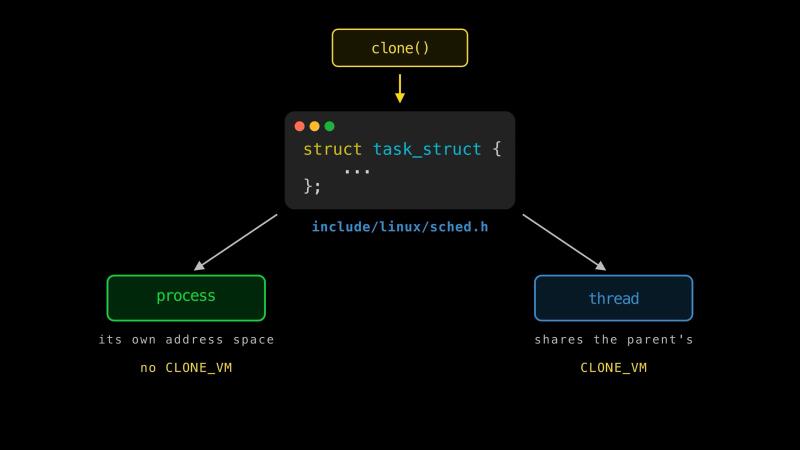
Finally, processes and threads are not as different as they look. The Linux kernel uses the same data structure, called a task (task_struct), for both, and creates both with the same system call (clone). The only difference is which resources you flag as shared. A task with its own address space is a process, whereas a task that shares its parent’s address space is a thread.
This was a lot to take in, but we are now in a good place to start talking about concurrency and parallelism.
Concurrency vs. Parallelism#
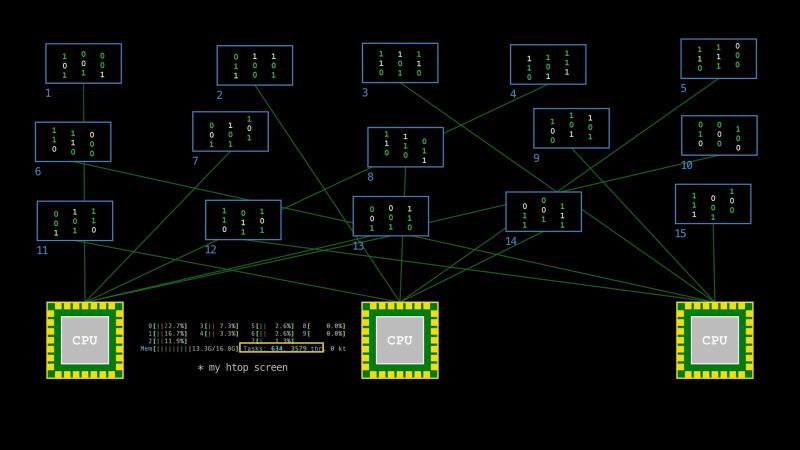
A single CPU can run multiple processes or threads concurrently by rapidly switching between them. Each of those switches is called a context switch: the OS saves where one execution context left off and restores the next. Because CPUs are extremely fast, from the outside it looks to us as if those processes are running in parallel. One reason to do this is responsiveness, so no task waits long for its turn. The other is keeping the machine busy, since a CPU sitting idle while a task waits on I/O is wasted.
Today, most smartphones, laptops, and desktops we own have multiple CPU cores, which makes true parallel execution possible. Right now, your device is running hundreds of tasks, so you get task switching and parallelism at the same time.
asyncio vs. threading vs. multiprocessing#
Historically, before multicore parallelism on the same chip, concurrency was already achieved by task switching with threads. Processes work for task switching too, but as we saw, threads are lighter to create and manage.
Let’s say we created a web server that waits for a connection, and once a request comes in, it reads an HTML file from disk and sends it over the network. Reading from disk and writing to a socket are both slow, and they were orders of magnitude slower back in the 1990s. A single request is fine. What if we get multiple requests at roughly the same time?
While a request is being served, the CPU is barely working. It spends most of its time waiting for the disk and for the network. Work like this is called I/O-bound: the bottleneck is waiting on hardware, not computing. If our server handles one request at a time, each new client waits for everyone ahead of them, even though the machine is not busy.
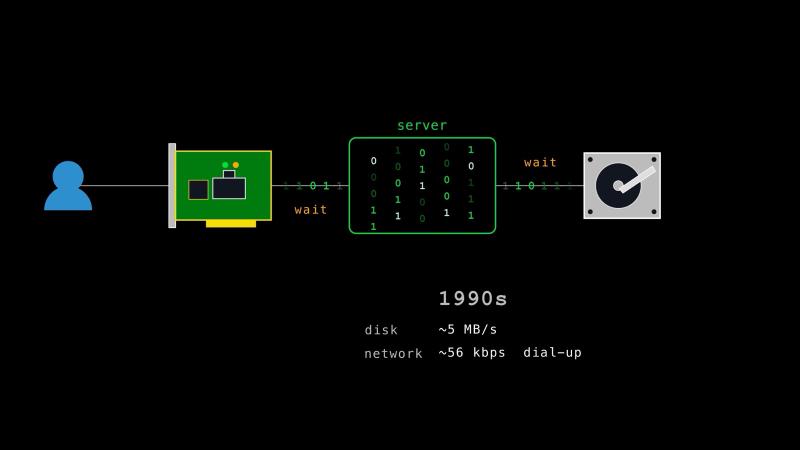
There are two solutions to this. The obvious one is to give each request its own thread, so when one blocks on I/O, the OS runs another.
The second solution uses only a single thread. But how do we get concurrency with a single thread? Extra CPU cores will not help, since a thread can only be run by one core at a time.
The answer is to ask the kernel, through a system call (select, epoll, kqueue), to notify us when data or a connection is ready, and then to work only on those. In Python, this is done with an event loop in the asyncio module. For example, when a network card completes writing data to memory, it notifies the kernel, which then notifies our process (usually a combination of polling and callbacks, a fancy term for a function that is run when something is done). Python’s asyncio event loop keeps its timers in a min-heap (heapq), so the next due callback is always the cheapest one to access. We mark our functions async, and we await calls that do not block. Every await that actually suspends is a point where that task hands control back. Resuming execution and yielding control back should look familiar. Underneath async functions there are generators, which we covered extensively in the previous chapter.
A quick note, since we said the network card writes to memory and then notifies the kernel. If only the kernel touches hardware, how does the card do it alone? That rule is only about user programs. The kernel hands the network card an address up front, and the card writes there itself (direct memory access). The code that drives each device usually runs in kernel mode too. Kernel developers cannot write code for every device ever made, so vendors ship their own. This is what a driver is. Other programs can also run in kernel mode, like anti-cheat software that watches for tampered input devices. The big risk is that a bug in kernel mode takes the whole machine with it. In July 2024, a single bad CrowdStrike update grounded flights and took hospital systems down.
The event loop and multithreading solutions differ in who decides when to switch. With an event loop, our code decides. A task runs until it sees an await and gives up control voluntarily. This is known as cooperative multitasking. If one task never awaits or makes a blocking call, no other task in that loop makes progress. We cannot fix a blocking function by putting await in front of it, because the call still runs and still blocks, and then the value it returns turns out not to be awaitable. What we can do is run it in a thread and await that instead (asyncio.to_thread). With threads, the OS decides instead. A hardware timer interrupt makes the OS save our thread and switch to another. This is known as preemptive multitasking. The advantage of this is that one thread cannot freeze the rest of the machine, even if it never cooperates. The operating system scheduler decides which thread runs next (Linux uses EEVDF, Earliest Eligible Virtual Deadline First, which is something like fairness first, urgency second).
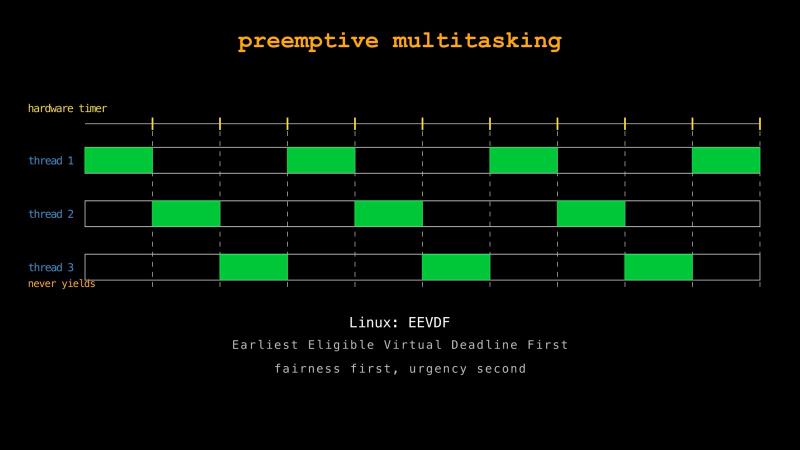
Because the GIL lets only one thread run Python bytecode at a time, CPython needs to add a second timer on top of the OS one. The OS timer alone does not help here, because the kernel knows nothing about the GIL. It can pause the holder, but the other Python threads are asleep waiting for the GIL, and the holder will not release it on its own. Instead, a waiting thread puts in a request, and the holder releases the GIL at the next opportunity. Python’s switching interval defaults to five milliseconds. You can get or set this value to see whether it affects your program’s performance.
>>> import sys
>>> sys.getswitchinterval()
0.005
>>> sys.setswitchinterval(0.001)
>>> sys.getswitchinterval()
0.001
>>> sys.setswitchinterval(0.05)
>>> sys.getswitchinterval()
0.049999999999999996
What if we have a task that is CPU-bound instead, where the bottleneck is computation and not waiting? Let’s say we have a large list of numbers and we want to find its maximum and its minimum. On a single core, the best we can do is iterate over the list once, updating a running maximum and minimum as we go.
With two or more cores, we can find the minimum on one core and the maximum on another. Splitting the work by job like this is task parallelism. Or we can split the data instead and give each core half of the list. But to find the maximum, don’t we need to see all of the data? If we only look at half, how do we know the other half doesn’t hold something bigger? The idea is that we combine the partial answers at the end. Each half reports its own maximum and minimum, and then we take the larger of the two maxima and the smaller of the two minima. Splitting the work by data like this is data parallelism. Task parallelism is the easier one here, because the jobs are already separate. Data parallelism takes more thought, since we have to find a way to split the work and then put the pieces back together efficiently. But data parallelism scales better. Task parallelism runs out at the number of jobs we have, which here is two, while data parallelism keeps going for as long as we have cores.
If we tried either of these in Python, though, we would probably find it slower than the single-core version, because of the overhead. Every process we start needs its own address space and context, and creating that costs time. Typically, the data also has to be pickled, sent through a pipe, and unpickled on the other side. If the list is small enough to scan in a few milliseconds, we spend more time moving the data than working on it. Parallelism pays off only when the work is large enough to cover that cost.
Threads would avoid some of that overhead, since they share an address space and data by default. But with the GIL, only one thread can run Python bytecode at a time, so for CPU-bound work, threads will not help. For I/O-bound work they still do, because a thread releases the GIL while it waits inside a system call, so another thread runs in the meantime. But CPU-bound work is where the GIL gets its bad reputation.
There are at least three ways around this. The first is to let the CPU-bound work happen outside Python. The standard library’s ctypes does this when it calls into a C library, and third-party libraries like NumPy do it while they compute. They keep their data in raw C buffers instead of Python objects, so their inner loops touch nothing the interpreter has to protect, which lets them release the GIL. Your threads really do run in parallel during that work despite the GIL. The second is to use subinterpreters from the concurrent.interpreters module. This provides several interpreters in one process, each with its own GIL. The third is the free-threaded build, which removes the GIL entirely. Removing the GIL does not make race conditions disappear. So, the one big lock is replaced by many smaller ones. This is not free either, since fine-grained locking usually costs single-threaded performance, and most Python code is single-threaded. Depending on your task and your Python version, one of these or something else may be the right fit.
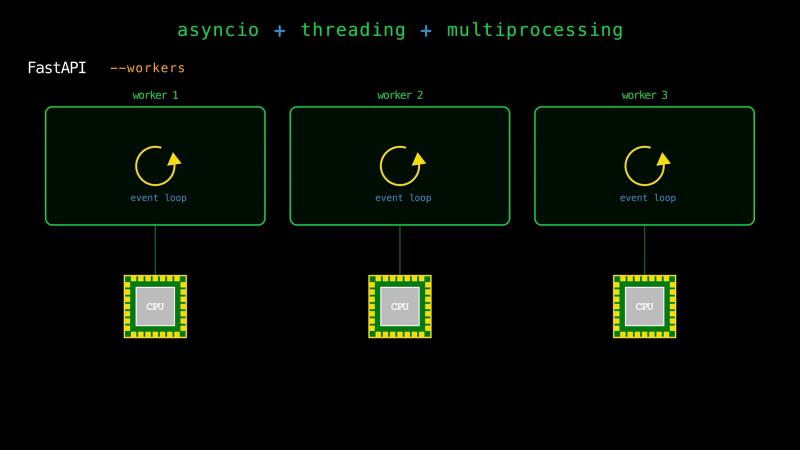
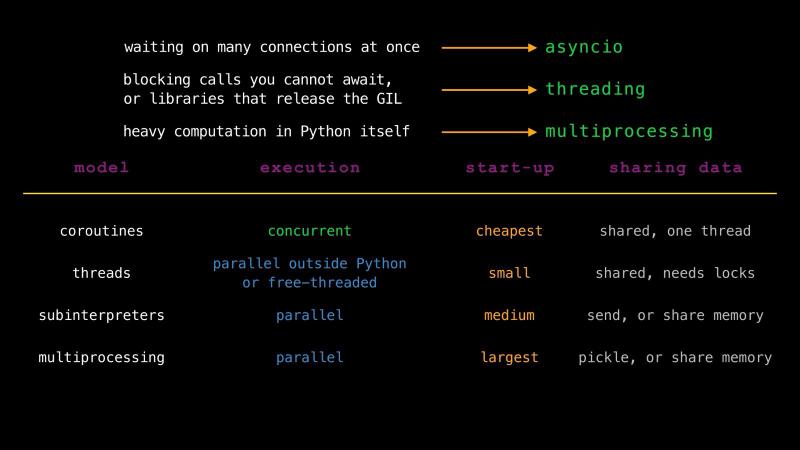
So, should you choose asyncio, threading, or multiprocessing? Real applications mix event loops, threads, and processes. For example, a typical FastAPI app runs with several worker processes (--workers), so it can utilize every core. Each worker runs its own event loop to handle many connections at once. And any endpoint you write as a plain def function rather than an async def coroutine function is handed off to a thread pool, so a blocking call inside it does not stall the loop. As a rule of thumb: waiting on many connections at once, reach for asyncio. Blocking calls you cannot await, or libraries that release the GIL, reach for threads. Heavy computation in Python itself, reach for processes. Underneath that, coroutines are the cheapest and are concurrent, threads are parallel when the work leaves Python or when you are on a free-threaded build, processes are parallel but pay for it, and subinterpreters sit in between.
CPU vs. GPU#
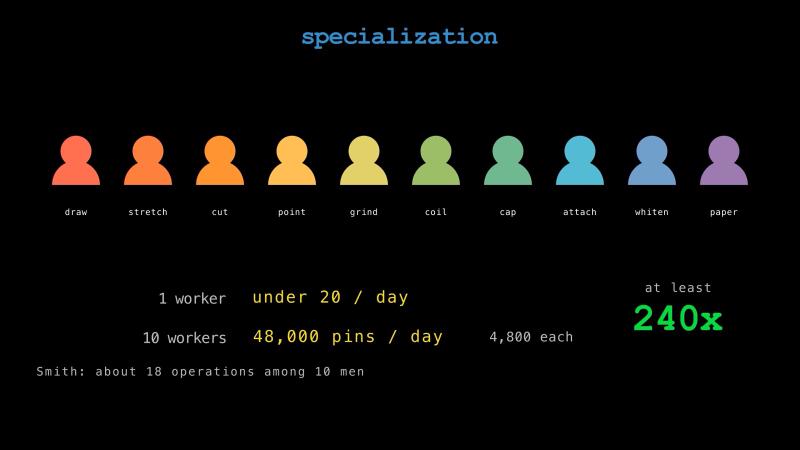
In 1776, Adam Smith (The Wealth of Nations) described a pin factory. One worker doing every step himself could not make even 20 pins in a day. Ten workers, each doing only a few of the steps, could make 48,000 in total, or 4,800 pins per worker per day. The gain, at least 240 times, came from specialization. For example, a worker who spends all day drawing wire gets very good at drawing wire.
That trade is the same between a CPU and a GPU. A CPU is the generalist, though not a pure one. Inside every core there are units built for a particular job: an arithmetic logic unit for integer math and comparisons, a floating-point unit for fractional numbers, and vector units that apply a single instruction to several values at once (SIMD). A CPU has a handful of relatively sophisticated cores. It predicts branches, reorders instructions, and keeps large caches, so it can run general instructions reasonably fast. A GPU, on the other hand, has thousands of simple cores that run the same instruction over different pieces of data at the same time. It cannot do most of the tricks a CPU can, but if we give it the same arithmetic across a huge array, it is many times faster, up to orders of magnitude. The classic examples are multiplying a vector by a scalar and adding it to another vector (DAXPY), or multiplying two matrices. Both are simple operations repeated over huge amounts of data.
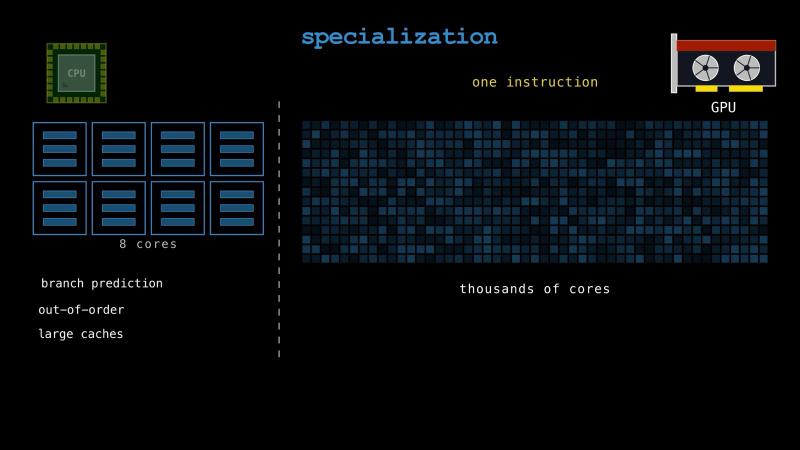
We know how to write code for the CPU in Python, but how do we write code for the GPU? In Python, we rarely have to write GPU functions ourselves. We call a library that already has them, like PyTorch, JAX, or CuPy (a drop-in replacement for NumPy and SciPy). These give us a NumPy-shaped API that runs on the GPU. If we do need a custom GPU function, there are libraries that compile our own Python down to something the GPU can run. Numba is one of them, and NVIDIA ships ready-made building blocks we can call from inside it (cuda.cooperative).
Contrary to common belief, a GPU core is not faster than a CPU core. Here are some representative numbers (for an operation like DAXPY on both).
| CPU | GPU | |
|---|---|---|
| Memory bandwidth | ~100 GB/s | ~1000 GB/s |
| Memory latency | ~100 ns | ~300 ns |
| Threads in flight | tens | hundreds of thousands |
The GPU is worse on latency. Any single memory access takes longer than it would on a CPU. Instead it has bandwidth and an enormous number of threads resident at the same time. The CPU wins on any one operation, but the GPU wins on total work done.
The high thread count also changes which shape of concurrency works better. Let’s go back to finding the maximum of a list. With a handful of cores, we split it into chunks, each core scans its own chunk, and we combine a few partial answers, so the time is set by the size of a chunk. With enough threads there is a better split. We compare the numbers in pairs, all at once, and we are left with half as many. We compare those in pairs and we have a quarter, and so on. Each round halves the problem, so a million numbers finish in about twenty rounds (log 1,000,000 base 2) in parallel, instead of a single pass scanning through hundreds of thousands of them. That is not worth doing on eight cores, because eight cores can only run eight comparisons at a time, so the rounds still happen mostly one after another. On a GPU, a whole round really does happen at once.
As we saw before with task switching on multiple CPU cores, concurrency and parallelism meet here too. From the CPU’s side, launching GPU work is an asynchronous call. We hand the work off to the GPU and keep going, and we only wait when we need the result. From the GPU’s side, that same work is parallel, thousands of cores running one instruction over different data. While the GPU is busy, we give the CPU something useful to do and synchronize as late as we can.
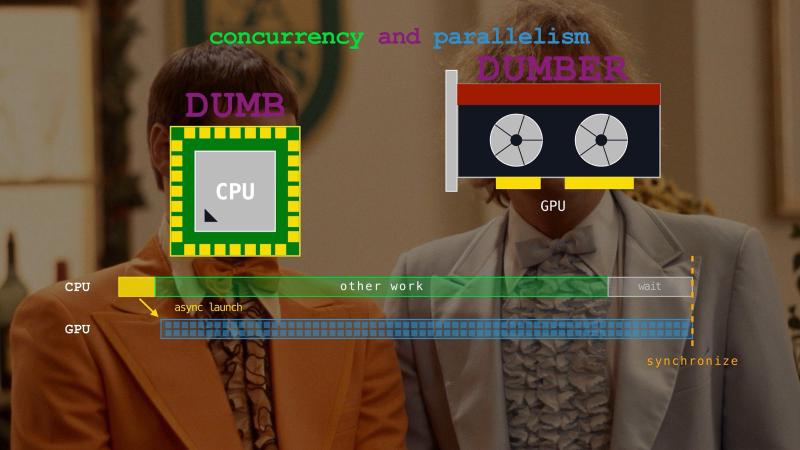
But remember, machines are just doing what they’re told, using simple instructions. They are not inherently smart. Everything clever about them comes from the engineering and techniques that have been developed over the years.
Conquer Concurrency#
How do you get better at concurrent programming?
The first step is building a solid mental model of what is happening underneath, so you can reason about what may or may not work before writing any code. Hopefully we covered that in this chapter.
The second step is knowing the APIs. There are details that can be learned only by doing. Take the await keyword. Awaiting a coroutine directly runs it right there, inside the caller, so nothing else of yours moves until it finishes. It can still yield to tasks that already exist whenever it reaches a suspending await. Wrapping it in an asyncio task instead hands it to the event loop, and then several of them can wait at the same time. That task does not start the moment you create it. It starts the next time control returns to the loop.
Or take queues. An asyncio queue is not thread-safe, which makes sense once you remember that the event loop runs on a single thread and you would be paying for a lock it does not need. If you need to pass data between threads, use queue.Queue. There are many details like this, more than we can cover, and you pick them up as you use the libraries.
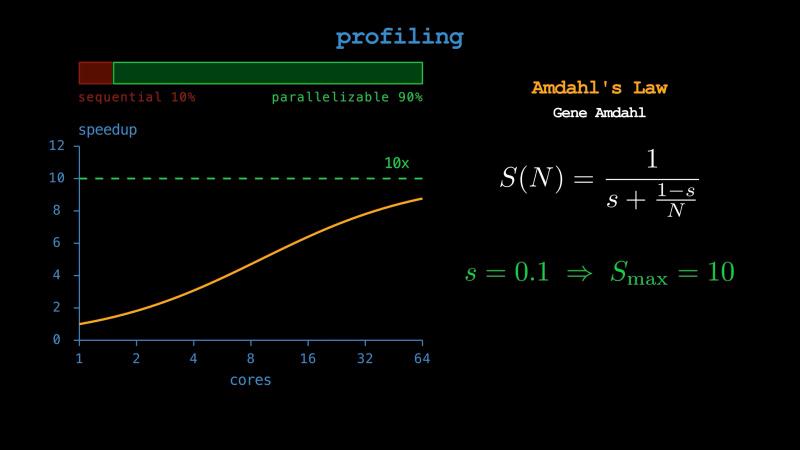
The third step is profiling. Real concurrent programs have many moving parts, and your intuition about where the time goes is usually wrong. Instead, a profiler measures where your program spends its time, and where it spends its memory. It also shows you which part stays sequential, and that part sets a hard ceiling. For example, Amdahl’s Law says that if a tenth of your work cannot be parallelized, no number of cores will ever make you more than ten times faster. For the event loop specifically, asyncio has a debug mode (asyncio.run(main(), debug=True)) that logs any callback hogging the loop for more than a hundred milliseconds. That is exactly the failure we saw earlier. Python also ships with a few profilers, and there are more from third parties.
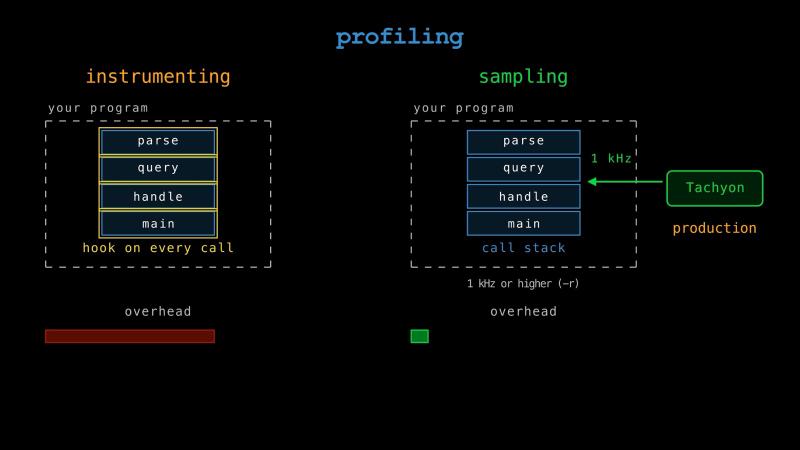
There is one more profiler to know about. Python 3.15 adds a sampling profiler called Tachyon, available as profiling.sampling. Instead of instrumenting every function call, it takes periodic snapshots of the call stack from outside your program, so the overhead on the program itself is almost nothing and you can even point it at production. It can attach to a process that is already running, without restarting it or changing a line of its code. Reading another process’s memory is not allowed by default for security reasons, so Tachyon goes through the kernel with a system call. Tachyon gives you several ways to look at the results: plain statistics, a flame graph you can open in a browser, a heatmap over your source, or a live view in the terminal.
Concurrency is one of the harder corners of computing, especially for Python developers. But if you get the mental model right, learn the APIs as you go, and profile the code, you will do really well. And as always, try to avoid premature concurrency.
Recap#
In this chapter, we developed an understanding of arguably the hardest concepts for Python developers.
One thing we used without explaining was that await behaves differently depending on what follows it: a coroutine, a task, a future, or an object from some library. How does one keyword handle all of them?
The answer is not in asyncio. It is in the way Python asks an object what it can do, and lets the object answer. That is what classes and their magic methods are for, and we will cover them in the next chapter. See you there.