
Introduction#
Let’s take a list and a set with 1000 numbers each, and see how long it takes when we look up a value.
>>> my_list = list(range(1000))
>>> target in my_list
?
>>> my_set = set(range(1000))
>>> target in my_set
?
But before we start benchmarking, a ruler for the scale. This is how much light travels in a nanosecond, the smallest unit we will be measuring.
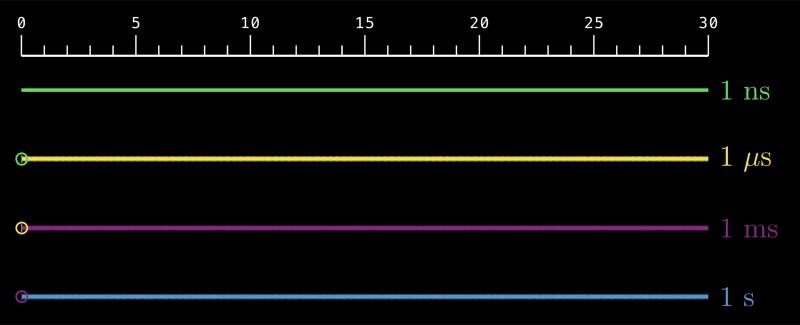
A second is a very long time in computing, which breaks into milliseconds, microseconds, and nanoseconds, each one a thousand times smaller than the last. Light travels about 300,000 kilometers in one second, enough to circle the Earth seven and a half times. In a millisecond, it travels 300 kilometers, the distance from New York City to Boston. In a microsecond, it travels 300 meters, a few city blocks.
So when we talk about operations taking nanoseconds or microseconds, we are talking about time scales far below human perception. This scale is important for machines though, as they can perform millions of operations in a blink.
List vs Set Benchmark#
Now back to the membership test.
First, we look up a value that is missing from the collection.
>>> my_list = list(range(1000))
>>> target = 1000
>>> target in my_list
False
The list has to scan every element to confirm it’s not there, taking 5.00 microseconds on average.
TARGET MISSING
n                list
1,000         5.00 us
Next, we look up a value that is present in the collection, picked at random for benchmarking.
>>> my_list = list(range(1000))
>>> target = 258
>>> target in my_list
True
This time the list takes 2.30 microseconds, since on average it scans half the elements before finding a match.
TARGET PRESENT
n                list
1,000         2.30 us
Not bad for a Python list, but how does it compare to a set?
TARGET MISSING
n                list          set          set quicker
1,000         5.00 us         8 ns                ~600x
TARGET PRESENT
n list set set quicker
1,000 2.30 us 15 ns ~150xThe set is about 600 times faster when the target is missing, and about 150 times faster when it’s present.
A thousand items in a collection is not that big by any standard. If we scale up to 10,000 items, the list takes 23.40 microseconds when the target is present, and 50.20 microseconds when it’s missing, while the set still takes about 15 nanoseconds. The gap is now around 6,000 times when the target is missing, and 1,500 times when it’s present.
TARGET MISSING
n                list          set          set quicker
1,000         5.00 us         8 ns                ~600x
10,000       50.20 us         8 ns              ~6,000x
TARGET PRESENT
n list set set quicker
1,000 2.30 us 15 ns ~150x
10,000 23.40 us 14 ns ~1,500xIn fact, for every tenfold increase in the collection size, the list takes about ten times longer, while the set stays constant.
TARGET MISSING
n                list          set          set quicker
1,000         5.00 us         8 ns                ~600x
10,000       50.20 us         8 ns              ~6,000x
100,000     507.50 us         8 ns             ~60,000x
1,000,000     5.08 ms         8 ns            ~600,000x
10,000,000   51.60 ms         8 ns          ~6,000,000x
TARGET PRESENT
n list set set quicker
1,000 2.30 us 15 ns ~150x
10,000 23.40 us 14 ns ~1,500x
100,000 247.00 us 14 ns ~15,000x
1,000,000 2.28 ms 14 ns ~150,000x
10,000,000 23.88 ms 14 ns ~1,500,000xSo we should always choose sets over lists in our code if we are doing membership tests.
Or should we?
What about the time it takes to build a list versus a set in the first place? And why do we care about performance here at all? We are still at the millisecond scale, which is fast enough for most applications.
To answer these questions, we will first look at the simplest built-in data types, then move to containers like lists, sets, and dictionaries.
Data Types#
In the previous chapter, we talked about the object model of Python. We learned that everything in Python is an object, and every object has an identity, a type, and a value. The type affects almost everything about an object, which is why understanding Python’s data types is key to writing better code.
Let’s start exploring the built-in data types in Python.
None Type#
NoneType is the type of the None object, which represents the absence of a value. We access this object through the built-in name None. It is often used to indicate that a variable has no value, or that a function does not return anything.
>>> type(None)
<class 'NoneType'>
None is immutable. It is also a singleton, the only instance of NoneType in memory. This is why the Pythonic way to check if a variable is None is to use the is operator instead of ==.
>>> a = None
>>> b = None
>>> a is b
True
>>> a is None
TrueBoolean#
The bool type has two values, accessed through the built-in names True and False, which represent truth values in Python and behave like 1 and 0 in almost all contexts. There is exactly one True object and one False object in memory, so bool is a doubleton, consisting of two singletons.
>>> type(True)
<class 'bool'>
>>> type(False)
<class 'bool'>
>>> a = True
>>> b = True
>>> a is b
True
>>> c = False
>>> d = False
>>> c is d
TrueLike None, a bool object is immutable. The bool type is often used in conditional statements and logical operations to control the flow of a program, which we will see in more detail in later chapters.
>>> a = True
>>> if a:
...     print("a is True")
a is True
You can get True from False, or vice versa, by using the built-in not operator.
>>> a = True
>>> b = not a
>>> b
False
>>> c = not b
>>> c
True
Every object can be evaluated in a boolean context, which means it can be used in conditional statements and logical operations. If a value evaluates to True in a boolean context, it is called truthy. If it evaluates to False, it is called falsy.
True and False are naturally truthy and falsy.
None is falsy.
>>> bool(True)
True
>>> bool(False)
False
>>> bool(None)
False
>>> if None:
...     print("This will not print anything")
... else:
...     print("But this will")
But this will
Let’s keep track of the data types we have covered so far in a table.
| Type | Family | Value | Mutability | Truthiness |
|---|---|---|---|---|
NoneType | None | None | Immutable | Falsy |
bool | Numeric | True, False | Immutable | Truthy, Falsy |
Even though it may not always look like it, boolean belongs to the family of numeric types because it is a subclass of integer. We will not go into the details of inheritance and object-oriented programming until later chapters, but for now, just know that booleans are a special kind of integer that can only take two values, which brings us to our next data type.
Integer#
The int type represents whole numbers without a fractional part. They can be positive, negative, or zero. Unlike most other programming languages, in Python, integers have virtually unlimited range, subject only to the available memory of the system.
>>> my_int = 42
>>> type(my_int)
<class 'int'>
>>> my_int = 0
>>> my_int = -100
>>> big_int = 2**999_999_999
>>> # much larger than the number of atoms in the observable universe
>>> # this needs 1 billion bits
>>> # or about 125 MB in memory
>>> # Python can handle even bigger
Integers are immutable. This is why when you perform an arithmetic operation on an integer, it creates a new integer object rather than modifying the existing one. As we saw in the previous chapter, some small integers are cached by Python for performance reasons, but this is an implementation detail and should not be relied upon in your code.
Integer objects are truthy if they are non-zero, and falsy if they are zero.
>>> bool(0)
False
>>> bool(1)
True
>>> bool(-1)
True
>>> bool(2026)
True| Type | Family | Value | Mutability | Truthiness |
|---|---|---|---|---|
NoneType | None | None | Immutable | Falsy |
bool | Numeric | True, False | Immutable | Truthy, Falsy |
int | Numeric | ℤ = {…, -1, 0, 1, …} | Immutable | 0 → Falsy, Non-zero → Truthy |
Float#
Floats aim to represent real numbers. They are implemented as double-precision floating-point numbers, which means they have a finite precision and can represent a wide range of values, but not all real numbers can be represented exactly.
>>> type(0.1)
<class 'float'>
>>> 0.1 + 0.2 == 0.3
False
>>> 0.1 + 0.2
0.30000000000000004
Floats are generally good for machine learning, scientific computing, measurements, graphics, simulations, and general numeric work, but not ideal for cases where exact decimal calculations are required, such as financial applications. For those cases, Python provides the decimal module.
>>> from decimal import Decimal
>>> x = Decimal('0.1')
>>> y = Decimal('0.2')
>>> x + y
Decimal('0.3')
>>> float(x + y)
0.3
Because Python does not implement its own custom float format the way it implements arbitrary-size integers, some aspects of float behavior, like range, precision, and overflow, may differ across platforms. You can check the details of the float implementation on your platform using sys.float_info.
>>> import sys
>>> sys.float_info
sys.float_info(
  max=1.7976931348623157e+308,
  max_exp=1024,
  max_10_exp=308,
  min=2.2250738585072014e-308,
  min_exp=-1021,
  min_10_exp=-307,
  dig=15,
  epsilon=2.220446049250313e-16,
  radix=2,
  rounds=1
)
Like integers, floats are immutable, and they are truthy if they are non-zero, and falsy if they are zero.
| Type | Family | Value | Mutability | Truthiness |
|---|---|---|---|---|
NoneType | None | None | Immutable | Falsy |
bool | Numeric | True, False | Immutable | Truthy, Falsy |
int | Numeric | ℤ = {…, -1, 0, 1, …} | Immutable | 0 → Falsy, Non-zero → Truthy |
float | Numeric | ≈ ℝ | Immutable | 0.0 → Falsy, Non-zero → Truthy |
Complex#
Python also has a built-in complex type that represents complex numbers. Complex numbers have a real part and an imaginary part, and they are used in various fields such as engineering, physics, and signal processing.
Python uses the j suffix to denote the imaginary part of a complex number, following the engineering convention where i is reserved for electrical current.
>>> z = 3 + 4j
>>> type(z)
<class 'complex'>
>>> z
(3+4j)
Complex numbers are represented as a pair of floats, accessible through the real and imag attributes. Like floats, complex numbers are immutable. They are falsy if both the real and imaginary parts are zero, truthy otherwise.
>>> z.real
3.0
>>> type(z.real)
<class 'float'>
>>> z.imag
4.0
>>> type(z.imag)
<class 'float'>| Type | Family | Value | Mutability | Truthiness |
|---|---|---|---|---|
NoneType | None | None | Immutable | Falsy |
bool | Numeric | True, False | Immutable | Truthy, Falsy |
int | Numeric | ℤ = {…, -1, 0, 1, …} | Immutable | 0 → Falsy, Non-zero → Truthy |
float | Numeric | ≈ ℝ | Immutable | 0.0 → Falsy, Non-zero → Truthy |
complex | Numeric | ≈ ℂ | Immutable | 0+0j → Falsy, Non-zero → Truthy |
Recap#
So far, we have covered the scalar data types. Each scalar is an atomic object. In the next part, we will see the most important container types, where each container holds many other objects. We will also finally resolve the question we started with: when to use a list versus a set. See you there!
| Type | Family | Value | Mutability | Truthiness |
|---|---|---|---|---|
NoneType | None | None | Immutable | Falsy |
bool | Numeric | True, False | Immutable | Truthy, Falsy |
int | Numeric | ℤ = {…, -1, 0, 1, …} | Immutable | 0 → Falsy, Non-zero → Truthy |
float | Numeric | ≈ ℝ | Immutable | 0.0 → Falsy, Non-zero → Truthy |
complex | Numeric | ≈ ℂ | Immutable | 0+0j → Falsy, Non-zero → Truthy |
str | Sequence | … | … | … |
bytes | Sequence | … | … | … |
tuple | Sequence | … | … | … |
list | Sequence | … | … | … |
bytearray | Sequence | … | … | … |
set | Set | … | … | … |
frozenset | Set | … | … | … |
dict | Mapping | … | … | … |