
Introduction#
Suppose you are working in NLP or AI like half of the world including myself. You want to do some text cleaning to prepare training data for a multi-language model. Your goal is to remove text with duplicate meaning within each language. So you “write” a quick cleaning function, even dusting off the ancient language of regex that was once known to humans but only spoken by LLMs these days.
| |
You run the function on an example input.
$ python -c "from preprocess import clean_text; print(clean_text('  The woman was walking \t\t \n \n Down a busy street  '))"
the woman was walking down a busy street
Looks like it’s working as expected. But there is a bug in this function. Can you spot it? I’ll give you a hint: it’s not regex related.
| |
Can you spot the bug now?
The whitespace and newlines are handled fine by strip and regex. The bug is caused by the str.lower() method. In German, “Straße” and “Strasse” both mean “street.” But str.lower() does not map them to the same lowercase string, so duplicates slip through our dedup.
$ python preprocess.py
Traceback (most recent call last):
  File "preprocess.py", line 13, assert clean_text(...) == clean_text(...)
                                 ^^^^^^^^^^^^^^^^^^^^^^^^^^^^^^^^^^^^^^^^^
AssertionError
The fix is to use the str.casefold() method. It applies Unicode case folding rules designed for caseless matching.
import re


def clean_text(text: str) -> str:
    """Normalize text for dedup."""
    text = text.strip()
    text = text.casefold()
    text = re.sub(r"\s+", " ", text)  # collapse whitespace
    text = re.sub(r"[^\w\s]", " ", text)  # replace punctuation
    return text


assert clean_text(
    "Die Frau ging langsam durch eine belebte Straße"
) == clean_text(
    "   Die Frau ging langsam durch\neine belebte Strasse  "
)
print("Assertion passed!")
$ python preprocess.py
Assertion passed!"Straße".casefold() gives "strasse", and now both versions match.
Other languages have similar cases. For example, Turkish has a dotless variant of lowercase i: ı, and dotted capital I: İ. Greek has two lowercase sigmas, σ and ς, same letter different position in the word. Sometimes these differences are easy to overlook.
$ python -c "assert 'finance' == 'finance'"
Traceback (most recent call last):
    assert 'finance' == 'finance'
           ^^^^^^^^^^^^^^^^^^^^^
AssertionError
In a wall of text, these two spellings look identical but are not the same. The first uses fi, a single Unicode ligature, the second uses fi as two characters. OCR software and PDF extractors produce these frequently.
Remember when I said the bug? I lied, it was actually a bug. There are more bugs in the code we thought we just fixed. But before we go hunting for them, let’s talk about what we can do about these bugs.
What we just did is called manual testing. We wrote the code, gave it some input, and checked whether the result was what we expected. The problem with our approach, even though we will see that there is a better way, is that we did this by hand. We ran the function a couple of times with different inputs, fixed the code to make sure it worked, and moved on. What happens when we or someone else later changes the code back to using str.lower()? In the best case we find out by doing some manual testing again. In the worst case we get silent failures. Imagine spending hours on compute to train your model only to realize that your training data had duplicates the whole time.
Manual testing does not scale. The better way is writing test code that checks your source code automatically. When you hear people say “testing” this almost always refers to automated testing, so we lose “automated” and just say “testing.” So, instead of eyeballing some output every time, the test code does it for you, and runs every time you change your code. If something breaks, you know immediately.
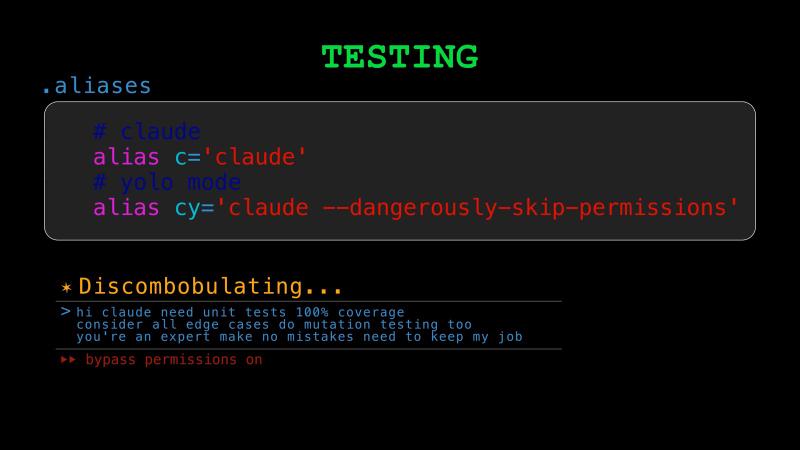
Today we will see how testing ensures that our code works correctly and continues to work correctly as we make changes. It gives us the confidence to refactor and improve any codebase without fear of breaking things. The same confidence carries over to letting AI make changes to our code, which matters as more and more coding is done with AI. We will also see how AI can accelerate the testing process itself.
Testing has a long history in software, but in data roles it is not emphasized as much as it should be. When a web app has a bug, the app crashes and someone notices. But a bad join in a pipeline produces plausible but wrong numbers, and nobody catches it for months. Traditional software validates data on the way in and trusts it on the way out. Data work is different: you are frequently reading data you did not produce, from sources you do not control. The prevalence of silent failures in data work is what makes testing even more important.
The primary goal of keeping data in traditional software is to serve the application, not to build a prediction model or train LLMs on it (fingers crossed on this last one). But if you are working as a Data Analyst, Data Engineer, Data Scientist, ML Engineer, or AI Engineer, your primary job is to analyze, interpret, and model messy and rarely structured data. We will see why testing data quality and pipelines, and why for any type of modeling, whether it is statistical, econometric, ML, or AI, modeling matters a lot.
Unit Tests#
We start with the same example we used at the end of the typing chapter.
| |
Here, the story is that a developer added a new customer tier but accidentally entered 1.4 instead of 0.4 for the discount value. From the type checker’s point of view, everything is valid. But from a business point of view a 140% discount does not make sense, and if we apply it, we get a negative price. So the code is type-correct, but the behavior is still incorrect. This is a bug that type checking alone cannot protect us from. Now let’s see how testing helps us catch errors like this, not just this time, but also as the codebase evolves.
Your first instinct might be to test apply_discount. Let’s start by writing a happy-path test.
| |
Python includes a built-in testing library, unittest, and the most popular third-party testing framework is pytest. This will not be a tutorial on either of them, except for one small pytest feature we will use. Let’s run our test with pytest.
$ pytest test_pricing.py
======================== test session starts =========================
configfile: pyproject.toml
collected 1 item

test_pricing.py .                                               [100%]
========================= 1 passed in 0.01s ==========================
This is a good starting point. The test checks that the function behaves correctly in a normal case. But it doesn’t protect us from the bug. In order to catch the bug, we add another test.
| |
======================================= test session starts ========================================
configfile: pyproject.toml
collected 2 items
test_pricing.py .F                                                                            [100%]
============================================ FAILURES ==============================================
___________________________ test_discounted_price_is_positive _____________________________

    def test_discounted_price_is_positive():
        for tier in Tier:
>           assert apply_discount(100.0, tier) > 0.0
E           assert -39.99999999999999 > 0.0
E            +  where -39.99999999999999 = apply_discount(100.0, <Tier.DIAMOND: 1.4>)

test_pricing.py:10: AssertionError
====================================== short test summary info =====================================
FAILED test_pricing.py::test_discounted_price_is_positive - assert -39.99999999999999 > 0.0
===================================== 1 failed, 1 passed in 0.02s ==================================
The test failed, and that is a good thing. pytest is telling us that there is a problem with the DIAMOND tier, which makes it easier to debug and fix.
But notice that pytest says “collected 2 items.” The second function loops over all five Tier members, so it actually makes five assertions inside a single test. If DIAMOND fails, the loop stops there, and we never learn whether the other tiers would also have problems.
pytest has a very simple way to break this down with the parametrize decorator. Instead of using a for loop, we tell pytest to run the test function once for each Tier member as a separate test case.
| |
$ pytest test_pricing.py
========================== test session starts ===========================
configfile: pyproject.toml
collected 6 items
test_pricing.py .F....                                              [100%]
E   assert -39.999... > 0.0
test_pricing.py:12: AssertionError
====================== 1 failed, 5 passed in 0.01s =======================
Now we can see there are 6 test cases: 1 happy-path test plus 5 parametrized ones, one for each tier. With the verbose flag, we can see each tier tested individually.
$ pytest test_pricing.py -v
============================ test session starts ==============================
configfile: pyproject.toml
collected 6 items
test_pricing.py::test_apply_discount_happy_path PASSED                   [ 16%]
test_pricing.py::...return_positive_values[Tier.DIAMOND] FAILED          [ 33%]
test_pricing.py::...return_positive_values[Tier.PLATINUM] PASSED         [ 50%]
test_pricing.py::...return_positive_values[Tier.GOLD] PASSED             [ 66%]
test_pricing.py::...return_positive_values[Tier.SILVER] PASSED           [ 83%]
test_pricing.py::...return_positive_values[Tier.BRONZE] PASSED           [100%]
E   assert -39.999... > 0.0
test_pricing.py:12: AssertionError
========================== short test summary info =============================
FAILED test_pricing.py::test_discounted_price_is_positive[Tier.DIAMOND]
======================== 1 failed, 5 passed in 0.01s ===========================
Now, our code has some tests, and that is really important. There are still two things we can improve, though.
In our codebase, it is very likely that other functions or methods also use the Tier enum we defined for discounts. That means they can have problems similar to the one we have here. Should we go ahead and write more tests for those cases to catch the same bug? We could, but that would be extra work we can avoid. If we step back for a moment, the real bug is not in apply_discount logic. The apply_discount function is doing exactly what we told it to do: it multiplies the price by one minus the discount rate. The real problem is in the data. DIAMOND has a value of 1.4, and that does not make sense as a discount rate. In this case, the better test is to go directly to the source of the problem and test the Tier values themselves.
| |
$ pytest test_pricing.py
=============== test session starts ================
configfile: pyproject.toml
collected 6 items
test_pricing.py .F....                        [100%]
E   assert <Tier.DIAMOND: 1.4> < 1.0
test_pricing.py:12: AssertionError
=========== 1 failed, 5 passed in 0.01s ============
This test catches the bug where it was introduced, and it does not depend on any downstream function. That gives us a useful general principle: test the thing that is wrong, as close to the source as possible. Let’s fix the bug now so our tests pass.
At this point, you might ask: are these enough tests? Are two tests too few? How would we know?
Coverage#
Coverage tells us which parts of the code were exercised by our tests. In Python, the coverage library reports statement coverage by default, and it can also measure branch coverage.
Let’s run coverage on our tests.
$ coverage run --source=pricing -m pytest test_pricing.py
$ coverage report
Name         Stmts   Miss  Cover
--------------------------------
pricing.py       9      0   100%
--------------------------------
TOTAL            9      0   100%
We have 100% coverage, which means every statement in our code was executed while the tests ran. Surely, that means we are well covered. You cannot get more than 100% coverage, right? What are you going to do, write tests for code that has not been written yet? Well, actually, that is a thing, and it is called Test-Driven Development. But TDD is a topic for another time.
Despite having 100% coverage, we are actually still not well covered, which brings us to the second issue we mentioned earlier. What if a developer entered a negative discount? The discounted price would become larger than the original price, which is a bug. But our tests currently do not catch this. Like before, the source of the problem is the Tier data. So we update our test function that would catch it.
| |
$ pytest test_pricing.py
=============== test session starts ================
configfile: pyproject.toml
collected 6 items
test_pricing.py ......                        [100%]
================ 6 passed in 0.01s =================
This helps us understand that coverage is good for finding untested code, but it is not very useful as a single number that tells you how good your tests are. In a way, we have translated the question, “How many tests do we need?” into something a little more tangible, like, “What percentage of statements should be covered by our tests?” That is still useful progress. In many codebases, you will see something like 80% coverage used as a minimum requirement.
There are also great teams that do not enforce a lower bound, because a coverage target can be easy to game, especially now that boilerplate tests are easy to generate with LLMs. What matters more is the quality of the tests, since 100% coverage may not be enough. There is no single ideal number. Even at 100% coverage, we can still miss edge cases, so testing needs to be thought through carefully. Teams should choose targets that fit their risk level and business needs.
Mutation Testing#
So, if coverage alone is not enough, and “you should think about testing carefully” is not exactly easy to act on, is there any low-hanging fruit we can pick? The next thing people often reach for is mutation testing. Mutation testing asks a tougher question: if I make a small change to the code, do my tests notice? There are libraries such as mutmut that can do this for you.
For example, imagine a mutant changes the apply_discount logic:
return price * (1 - tier)into this:
return price * (1 + tier)If your tests still pass, that is a red flag. This means that your tests were not really checking the behavior closely enough. In our case, the happy-path test catches it.
$ pytest test_pricing.py
========================== test session starts ==============================
configfile: pyproject.toml
collected 6 items
test_pricing.py F.....                                                 [100%]
================================ FAILURES ===================================
_____________________ test_apply_discount_happy_path ________________________

    def test_apply_discount_happy_path():
>       assert apply_discount(100.0, Tier.GOLD) == 80.0
E       assert 120.0 == 80.0
E        +  where 120.0 = apply_discount(100.0, <Tier.GOLD: 0.2>)

test_pricing.py:6: AssertionError
========================= short test summary info ===========================
FAILED test_pricing.py::test_apply_discount_happy_path - assert 120.0 == 80.0
======================== 1 failed, 5 passed in 0.03s ========================
The mutant was killed. So, our tests are sensitive enough to detect this kind of change.
Property-Based Testing#
Earlier, we stated a property that the discount tiers should satisfy, and tested it. Similarly, apply_discount has properties it should satisfy. Since our tier values are valid discounts between zero and one, for any positive price the discounted result should also stay strictly between zero and the original price. Because the discount tier has a small, fixed set of members, we could test the property for every value. But apply_discount also takes a price argument, which makes the input space too big to test exhaustively. That is where we can go one step further with the Hypothesis library, or more generally, property-based testing. You describe your hypothesis or a property that should hold for many inputs, including edge cases you may not have thought of.
| |
This test does not hardcode a single example. It expresses a rule that should always be true. Let’s run it.
$ pytest test_pricing.py -v --tb=short
=============================== test session starts ================================
configfile: pyproject.toml
plugins: hypothesis-6.151.11
collected 7 items
test_pricing.py::test_apply_discount_happy_path PASSED                        [ 14%]
test_pricing.py::test_tier_is_valid_discount_rate[Tier.DIAMOND] PASSED        [ 28%]
test_pricing.py::test_tier_is_valid_discount_rate[Tier.PLATINUM] PASSED       [ 42%]
test_pricing.py::test_tier_is_valid_discount_rate[Tier.GOLD] PASSED           [ 57%]
test_pricing.py::test_tier_is_valid_discount_rate[Tier.SILVER] PASSED         [ 71%]
test_pricing.py::test_tier_is_valid_discount_rate[Tier.BRONZE] PASSED         [ 85%]
test_pricing.py::test_discounted_price_stays_between_zero_and_original FAILED [100%]
E   assert 5e-324 < 5e-324
E    +  where 5e-324 = apply_discount(5e-324, <Tier.DIAMOND: 0.4>)
============================= 1 failed, 6 passed in 0.11s ==========================
It failed. And we did not write that test case. Hypothesis generated it. The price 5e-324 is a subnormal float, the smallest positive value IEEE 754 can represent. At that scale, apply_discount(5e-324, 0.4) rounds back to 5e-324 because the result is too small to represent with any more precision. So the strict < price assertion fails since the discounted price equals the original.
We can disallow subnormal floats in the strategy.
@given(
    price=st.floats(min_value=0, exclude_min=True, allow_subnormal=False),
    tier=st.sampled_from(Tier),
)
def test_discounted_price_stays_between_zero_and_original(price, tier):
    assert 0.0 < apply_discount(price, tier) < price
$ pytest test_pricing.py --tb=short
========================== test session starts ===========================
configfile: pyproject.toml
collected 7 items
test_pricing.py ......F [100%]
E assert inf < inf
E + where inf = apply_discount(inf, <Tier.DIAMOND: 0.4>)
======================== 1 failed, 6 passed in 0.12s =====================It failed again, with a different input. This time Hypothesis tried infinity. Infinity times anything is infinity, so apply_discount(inf, 0.4) returns inf, and inf < inf is false. We disallow infinity too.
@given(
    price=st.floats(min_value=0, exclude_min=True, allow_subnormal=False, allow_infinity=False),
    tier=st.sampled_from(Tier),
)
def test_discounted_price_stays_between_zero_and_original(price, tier):
    assert 0.0 < apply_discount(price, tier) < price
$ pytest test_pricing.py
========================== test session starts ===========================
configfile: pyproject.toml
collected 7 items
test_pricing.py ....... [100%]
========================= 7 passed in 0.10s =============================pytest reports seven tests here, but that last Hypothesis test is actually exercising many generated inputs under the hood. Hypothesis kept finding edge cases in the float space until we constrained the strategy enough. This reveals a real problem in our code: accepting any float as a price without validation is dangerous. We will talk about parsing and validation in the next chapter.
MC/DC#
So far, everything we have talked about comes from the world of everyday software development. It is worth noting that there is a much stricter standard in safety-critical systems that is called MC/DC, which stands for Modified Condition/Decision Coverage. If you are building flight control software, medical devices, or autonomous defense systems, regulators may require MC/DC. So if you plan to work in defense tech or at a “dual-use” company like Anduril, Palantir, or OpenAI, take notes.
The idea is that executing every statement or branch is not enough. You need to show that each individual condition in a decision independently affects the outcome.
Here is an example:
def can_launch(is_armed: bool, safety_key_inserted: bool) -> bool:
    if is_armed and safety_key_inserted:
        return True
    return False
Now suppose you write these two parametrized tests:
| |
Those tests give you 100 percent statement and branch coverage, because both the true and false paths run. But they do not satisfy MC/DC. Why not? Because both conditions changed at the same time. Neither condition has been shown to independently flip the outcome.
To satisfy MC/DC, you add the missing test vectors:
| |
Now each condition has been shown to independently flip the result. MC/DC also requires completeness: each condition must take both true and false values across the test suite. Our three vectors satisfy that too, since is_armed and safety_key_inserted each appear as both True and False.
Every test we wrote so far was for small pieces of our code in isolation, which are called unit tests. How do we test our code at larger scales, for example to check how different parts of our system work together? To answer that, let’s look at the different kinds of testing and how they relate to each other.
Testing Pyramid#
The different kinds of testing are usually shown as a pyramid with three layers.
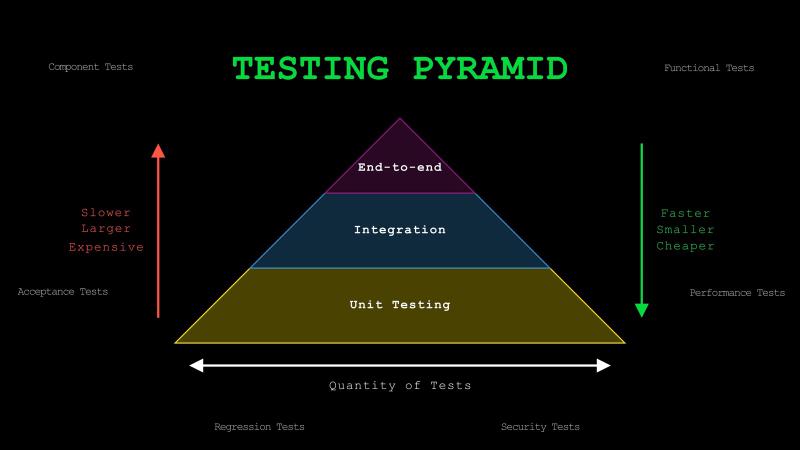
At the base are unit tests. As we saw, these test individual functions or methods in isolation, or more generally, the smallest units of code. What counts as the smallest unit is not always obvious. A useful rule of thumb is to think of it as the smallest piece of logic that does one coherent thing, such as making a decision, transforming data, or applying a rule, and can still be tested on its own. Unit tests are fast, small, and relatively cheap to write and run, so they usually make up the largest portion of your test suite.
The middle layer is integration tests. These verify that multiple components work together correctly. For example, that might mean testing a function that reads from a database, a service that calls an external API, or a pipeline that pulls data, applies transformations, and writes the resulting features to a feature store. These tests are slower and broader than unit tests, but they are valuable because many production failures happen at the boundaries between components.
At the top are end-to-end tests, or e2e for short. These simulate real user workflows across the entire system. For example, that might mean testing that a user can complete a checkout flow from start to finish. In an LLM application, it could mean testing the full path from a user question to document retrieval, prompt construction, answer generation, and finally showing that answer in the UI. These tests are the slowest, broadest, and most expensive to maintain, so you usually want fewer of them.
There are many other types of tests, including component tests, functional tests, acceptance tests, performance tests, regression tests, and security tests. We focus on unit, integration, and end-to-end because they map to increasing scope and cost, and they build the right intuition for everything else.
Integration and E2E Tests#
Let’s see what integration testing looks like by returning to clean_text. Earlier, we said there were more bugs hiding in it.
The fi ligature is not actually a bug: casefold() already decomposes it. The real issues are subtler. “café” can be encoded as a single character or as “e” plus a combining accent, and our function treats those differently. The fix is unicodedata.normalize("NFKC", text). There is also an ordering bug: collapsing whitespace before removing punctuation leaves double spaces, and punctuation removal can leave leading and trailing spaces. Swap the two regex lines and move strip() to the end to fix that.
Here is the corrected version:
| |
In a real system, clean_text does not exist in isolation. For example cleaned text could be flowing into an encoder, and the encoder would then write vectors to a database. Integration testing checks that these components work together across boundaries, not just individually. If an integration test fails, you know the pipeline is broken, but not which component caused it.
Take two strings that look different but should produce the same result after cleaning:
"  Die Straße , cafe\u0301\n\n machine-learning  "
"die strasse café machine learning"
Both go through clean_text, then through an encoder. If cleaning works correctly, both produce identical vectors.
| |
When an integration test depends on external systems like a database or an API, you can use mocks to simulate them. Python’s unittest.mock library with Mock and MagicMock is the standard tool for this.
An end-to-end test has the same idea but would go further. For example, you might test the entire flow from raw input in, cleaned and encoded, stored in a database, vectors used for RAG, and the user sees the result in the UI. One difference from integration tests is that you would do this with no mocks, unless absolutely necessary, to test the real system as closely as possible.
Practical Tips#
Test behavior, not implementation. Do not test that casefold() was called, someone can implement the same behavior differently. Think of it as Given-When-Then, without referring to the implementation: given some setup, when I run the function, then I expect this output.
No need to test built-in or popular third-party libraries. They already have large test suites and are battle-tested by millions of users. Test how your code uses the libraries and integrates with them. We did this with clean_text by testing the output of our function, not whether re.sub() or casefold() work correctly on their own.
When you start working on an untested codebase, write a couple of end-to-end tests first. They catch big breakages immediately. Then, as you work on specific parts, add integration and unit tests before modifying the existing code. This flips the pyramid, but it is a pragmatic approach.
Label your tests by type. Unit tests should run frequently like on every save, every commit, every push. Integration and end-to-end tests are slower and often depend on external systems, so you usually run those only in CI. pytest markers like @pytest.mark.integration or @pytest.mark.e2e make it easy to select which tests to run locally and which to leave for the pipeline.
Use AI to accelerate testing. Developers have always hated writing tests because it is boring, repetitive work for most. Now AI can draft a solid first set of tests pretty quickly. Tell it what kind of testing you want: if you ask for coverage targets, mutation testing, or property-based testing by name, the results are much better than just saying “write tests.”
Be careful when testing floating-point values. We saw Hypothesis catch subnormal floats and infinity in our pricing tests. The same issues come up constantly in data work: model metrics, aggregations, financial calculations.
$ python -c "print(0.1 + 0.2 == 0.3)"
False
Use approximate comparisons instead of exact equality with float values, pytest provides pytest.approx for this.
| |
NumPy has numpy.testing.assert_allclose for arrays, PyTorch has torch.testing.assert_close. If you do numerical work, approximate comparisons should be your default.
Conclusion#
Previously, in the typing chapter, we added type annotations to catch bugs that testing alone would not catch. Today, we learned about adding tests to verify correctness, and catch the kind of bugs that type checkers cannot see. Together, typing and testing catch most issues in our own code before they reach production.
But in real systems, a lot of the data comes from sources which we cannot fully control: API requests, config files, CSV uploads, user input. Nothing stops someone from sending {"price": 0, "tier": "DIAMOND"} to your endpoint. We spent an entire chapter hardening clean_text, but how do we even know the file we read to clean is a valid string? What if it is binary, or truncated, or in an encoding our code does not expect?
In the next chapter, we will talk about parsing and validation to complete what I call the typing, testing, and parsing holy trinity. We will see how to take raw, untrusted input and turn it into data our code can actually rely on. See you there.